live webinar
OCT 29 | 11 AM PT
Where TikTok Shop is Winning: Follow the sales, find your opportunity.
SAVE MY SPOT



SmartScout now works inside the AI assistants your team already uses. One server URL gives Claude, ChatGPT, or Microsoft Copilot access to 20 SmartScout analytics tools, and setup takes a few minutes with nothing to install.
Once connected, you can ask in plain English to search products, brands, sellers, and keywords, pull sales history and organic ranks, check ad spy data, or get a full brand, product, seller, or subcategory profile in one request.
You need two things for any platform.
There is nothing to install. No Docker, downloads, or config files. The SmartScout server is hosted for you at:
https://www.smartscout.com/amazon-data-mcp
Your queries run on your own SmartScout account. Your API key sits behind a private session token and is never shown to the AI assistant or stored on the server.
This works in any modern browser, including Chrome, Edge, Safari, Firefox, and Arc.
Go to claude.ai and sign in on any laptop, desktop, or tablet.
Click your profile picture in the bottom-left corner, then go to Settings > Connectors. At the top of the page, find the small Customize link, usually next to "Browse connectors" or in the top-right corner. Click it to show the option for adding a custom connector.
On a Team or Enterprise plan, an admin may need to turn on custom connectors first.
Click Add custom connector and paste https://mcp.smartscout.com/. Leave Client ID and Client Secret blank, then click Save.
Claude opens a new tab with the SmartScout authorization page. Sign in with your SmartScout email and password, then paste your API key and click Connect.
If the tab does not open, your browser is blocking pop-ups. Allow pop-ups for claude.ai and try again.
The first time Claude uses a SmartScout tool, you will see a prompt such as "Claude wants to use SearchBrands from SmartScout." Choose one option:
If you clicked Deny by mistake, change it in Settings > Connectors > SmartScout > Permissions.
The SmartScout tools now appear in the tools menu. Try this prompt:
Use SmartScout to show me top brands in coffee makers
The connection syncs to your Claude account, so SmartScout is ready on any browser, tablet, or phone where you sign in.
In Claude Desktop, go to Settings > Connectors and click Add custom connector. If you do not see the button, your workspace admin needs to turn on custom connectors (Team and Enterprise plans).
Enter https://mcp.smartscout.com/ as the Remote MCP server URL. Leave Client ID and Client Secret blank, then click Save. Claude Desktop opens a browser window to authorize.
On the SmartScout authorization page, sign in with your SmartScout email and password. Then paste your API key and click Connect.
The SmartScout tools appear in the tools tray. Try this prompt:
Use SmartScout to show me the top brands in the coffee maker subcategory
Setup uses Developer mode, which is only available on the ChatGPT website, not the mobile apps.
On the ChatGPT website, go to Settings > Apps & Connectors > Advanced settings and switch on Developer mode. If you do not see Advanced settings, your plan or workspace admin needs to allow it.
Back in Settings > Apps & Connectors, click Create. Name the app SmartScout and paste https://mcp.smartscout.com/ as the MCP server URL.
For the app icon, upload the SmartScout logo. It is under ChatGPT's 10 KB limit. If you skip this, ChatGPT shows a generic letter instead.
Leave authentication set to OAuth (the default) and click Create. ChatGPT opens a browser step to authorize.
On the SmartScout authorization page, sign in with your SmartScout email and password. Then paste your API key and click Connect.
Open a new chat, add SmartScout from the + (apps) menu, and ask:
Use SmartScout to show me the top brands in the coffee maker subcategory.
Note for Plus and Pro users: Individual plans allow read-only custom connectors. Every SmartScout tool is read-only, so all 20 work as expected.
Copilot setup has two parts. Your IT admin adds SmartScout to your organization once, which takes about 5 minutes. After that, everyone in the approved groups can use it in Word, Outlook, Excel, Teams, or the browser with no setup.
Step 1: Open Copilot Studio. Sign in at copilotstudio.microsoft.com with your Microsoft 365 admin account. You need a Copilot Studio license, which most Microsoft 365 Copilot subscriptions include.
Step 2: Add SmartScout as a tool. Pick an agent or create a new one called "SmartScout Insights." Open the Tools tab, click Add a tool > Model Context Protocol, and paste https://mcp.smartscout.com/. Upload the SmartScout logo under the agent's Details so users see it instead of a generic placeholder.
Step 3: Set authentication and sign in. When Copilot Studio asks how to connect, choose:
A browser tab opens to the SmartScout authorization page. Sign in with a SmartScout email and password, paste your organization's API key, and click Connect.
Step 4: Publish to your organization. Click Publish, then under Channels, turn on Microsoft 365 Copilot. Choose which users or groups can access it. Everyone in those groups now sees SmartScout as an agent inside Copilot.
What are the top 5 fastest-growing brands in dog toys this quarter?
Copilot picks the right SmartScout tool, runs it, and answers in plain English with charts and links.
Web or desktop? Both give the same tools and answers. Use copilot.microsoft.com for quick research on any device, including Mac, Windows, Chromebook, or tablet. Use Copilot inside Teams, Outlook, Word, Excel, or PowerPoint to drop results straight into a document or email and reference open files in your prompt.
You can also connect SmartScout directly to Copilot Chat in VS Code 1.93 or later with GitHub Copilot installed.
Open the command palette, run MCP: Add Server, pick HTTP, and paste the SmartScout URL. Or add this to .vscode/mcp.json:
{
  "servers": {
    "smartscout": {
      "type": "http",
      "url": "https://mcp.smartscout.com/"
    }
  }
}
Open Copilot Chat in Agent mode and the SmartScout tools appear in the picker. Sign-in uses the same SmartScout authorization flow.
On any platform, you are set up when:
{"status":"ok"}.
Contact your SmartScout sales representative, or schedule a demo.
New SmartScout data shows RYZE, a mushroom coffee blend, now brings in more revenue than Nescafe or Starbucks in Amazon's Instant Coffee category. The caffeine alternatives made without coffee are growing at a fraction of that pace, and several of the best-known names are shrinking.
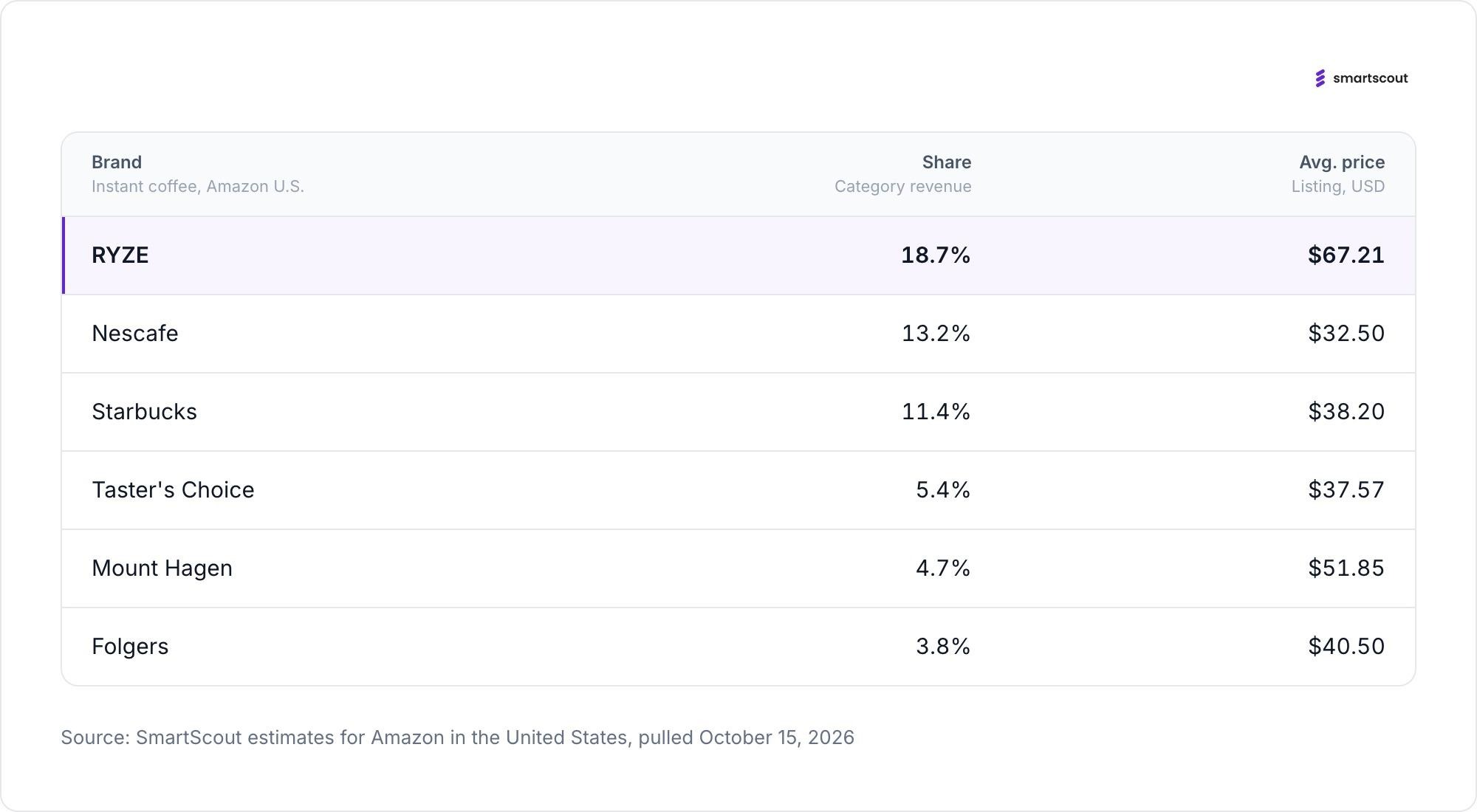
RYZE blends mushroom powders with a smaller dose of coffee and sells it as a gentler way to start the day. On Amazon it is now the top brand in Instant Coffee, with 18.7 percent of category revenue, or $3,374,391 a month.
Nescafe is second at 13.2 percent and $2,376,174. Starbucks is third at 11.4 percent and $2,052,561. Taster's Choice, Mount Hagen and Folgers follow, each with less than 6 percent.
RYZE gets there with far fewer units. It moves 68,025 units a month in the category, against 192,592 for Nescafe. Its average listing price is $67.21, roughly double Nescafe's $32.50 and Starbucks' $38.20. It needs nine listings to do it. Nescafe has 159.
Across all 22 of its products, RYZE brings in $4,191,101 a month, or $75,938,416 a year. That is up 43.2 percent from a year ago, and every sale goes through a single seller.
A product marketed as a way off coffee is now the best-selling coffee in its aisle.
The growth is happening while interest, measured by search, is falling. Searches for "ryze mushroom coffee" fell 21.3 percent over the past year, from 439,680 a month to 346,056. Searches for the generic term "mushroom coffee" fell 22.2 percent, to 195,516.
The rest of the category followed. Searches for Cuppa mushroom coffee fell 22.9 percent. Four Sigmatic fell 19.1 percent. Everyday Dose fell 76.4 percent, to 12,880 a month. Laird was the one brand search that grew, up 20.1 percent.
Revenue moved the other way. RYZE is up 43.2 percent. Everyday Dose, despite the collapse in searches for its name, grew revenue 12 percent, to $20,463,289 a year.
One reading of the gap is that mushroom coffee has stopped being new. Shoppers who already drink it do not search for it. They reorder.
The curiosity phase is ending. The habit phase pays better.
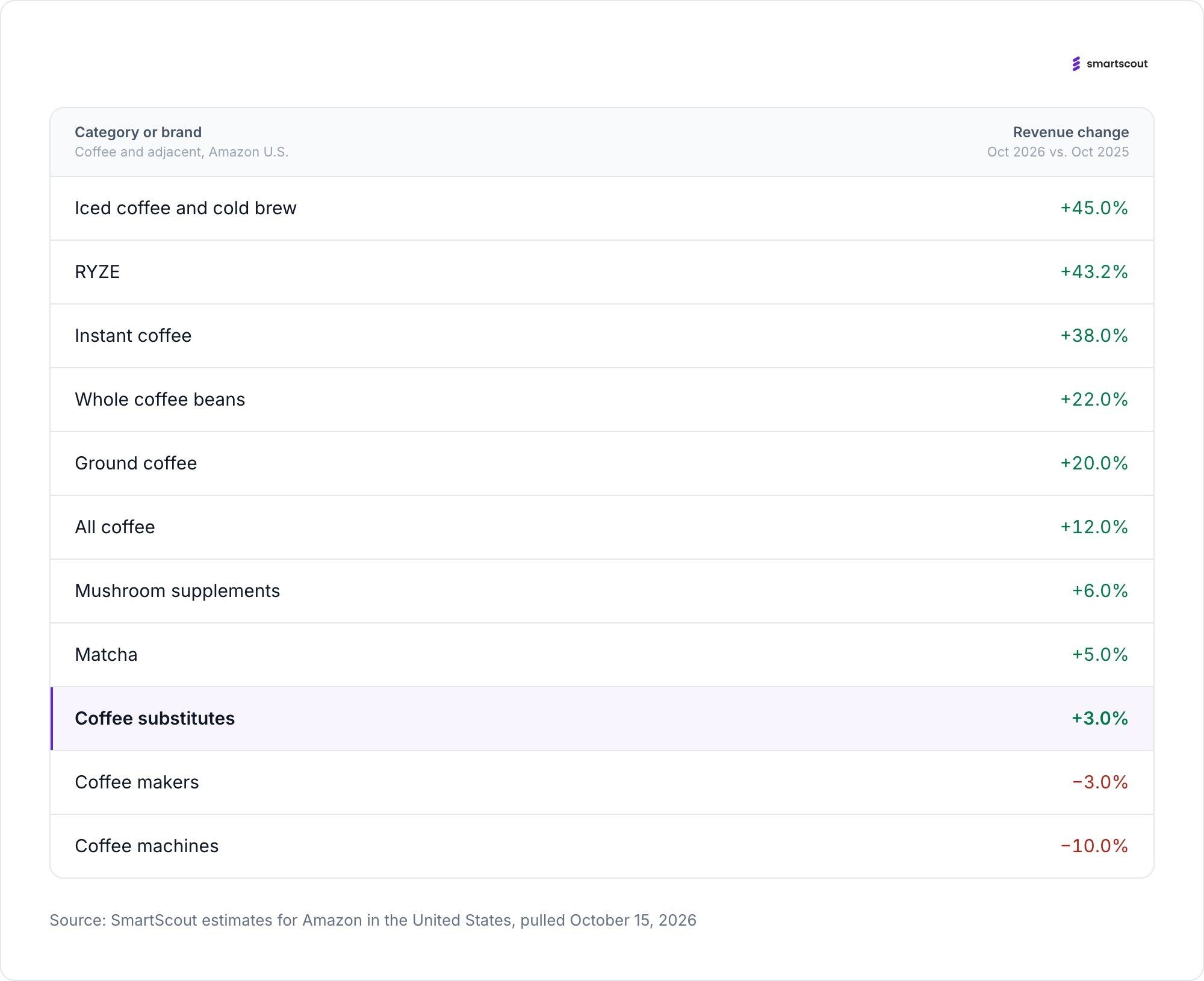
The idea that Americans are quitting coffee does not show up in Amazon's numbers. The Coffee category brings in $3,100,079,393 a year, up 12 percent from a year ago. Amazon sells about 70 percent of it directly.
Every major format grew, and the most convenient ones grew fastest. Iced coffee and cold brew rose 45 percent, to $61,542,398 a year. Instant coffee rose 38 percent, to $217,184,442. Whole beans rose 22 percent and ground coffee 20 percent, to $382,940,139 and $430,872,515. Ready-to-drink bottled coffee rose 13 percent.
What goes in the cup is growing too. Coffee creamers are up 36 percent, to $89,506,211 a year. Plant-based creamers are up 31 percent.
The tell is the hardware. Coffee makers are down 3 percent, to $806,265,513 a year, and coffee machines are down 10 percent. Shoppers are spending more on coffee and less on the equipment that brews it the traditional way.
Revenue includes price changes, so some of that 12 percent is higher prices, not more cups. Even so, no format of coffee itself is shrinking.
Ranking caffeine alternatives on Amazon by year-over-year revenue growth produces a clean gradient. The closer a product stays to coffee, the faster it grows.
Where coffee is still in the cup, growth is strongest: RYZE up 43.2 percent, the Instant Coffee category it leads up 38 percent.
Where coffee is replaced by a supplement or a tea, growth slows to single digits: mushroom supplements up 6 percent, to $308,098,398 a year, and matcha up 5 percent, to $123,185,356.
Where coffee is replaced entirely, growth nearly stops. Coffee Substitutes, the caffeine-free roasted blends made from chicory, grains and herbs, grew 3 percent, to $30,999,728 a year. Amazon shoppers spend about 100 dollars on coffee for every dollar they spend on substitutes. Searches for "coffee alternative" fell 19.6 percent.
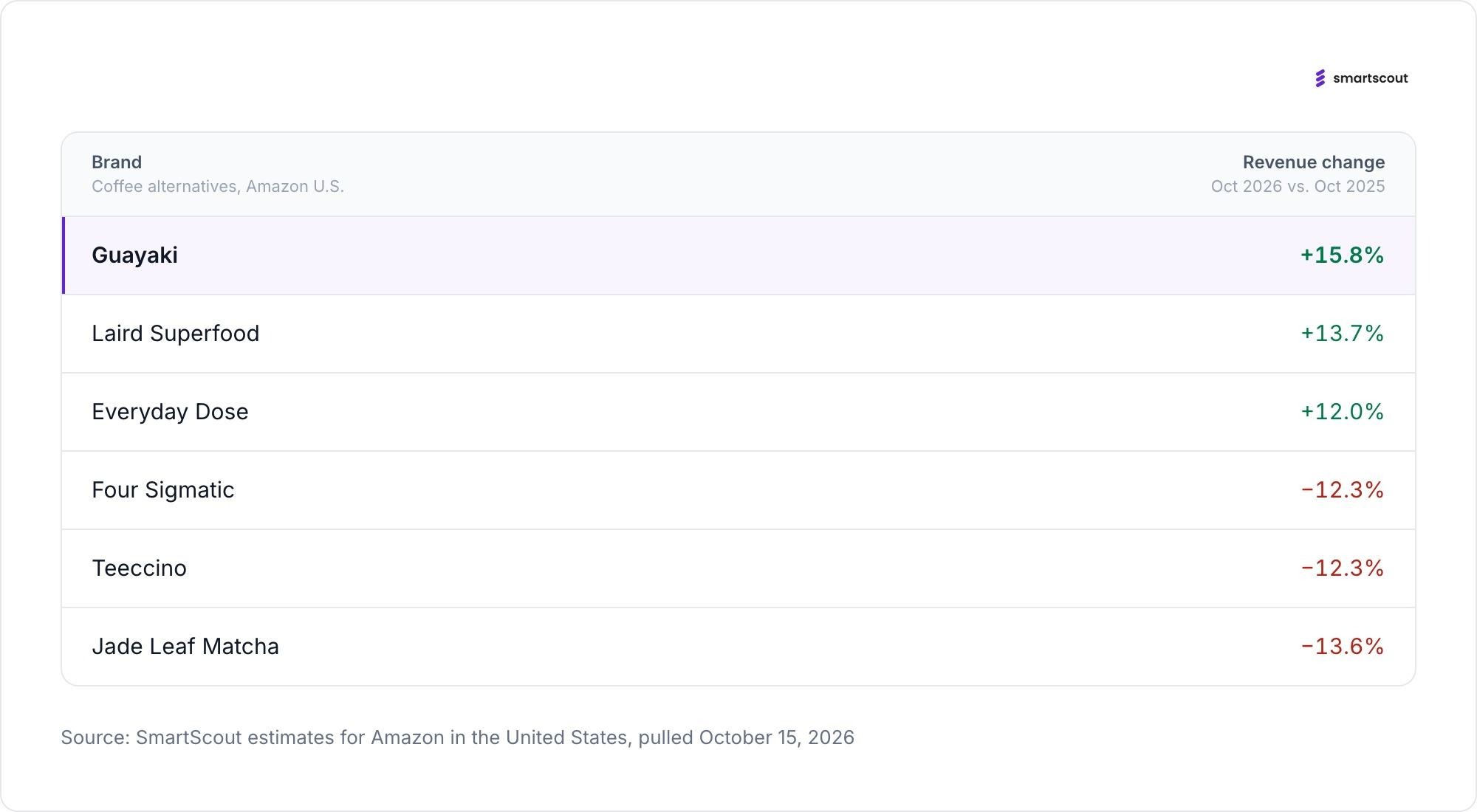
The brand results split the same way. Guayaki grew 15.8 percent, Laird Superfood 13.7 percent and Everyday Dose 12 percent. Four Sigmatic, one of the first mushroom coffee brands, fell 12.3 percent, to $22,751,545 a year. Teeccino, the best-known herbal coffee, fell 12.3 percent. Jade Leaf Matcha fell 13.6 percent, to $22,564,216.
The market is rewarding products that keep the coffee and change the rest.
Guayaki is the exception that proves the pattern. Its growth came from changing what it sells.
Searches for loose yerba mate fell 33.0 percent, from 131,079 a month to 87,876. Searches for yerba mate tea fell 27.9 percent. Searches for yerba mate energy drinks rose 148.0 percent, from 14,787 to 36,678. Amazon now lists Guayaki, which sells under the Yerba Madre storefront, in Energy Drinks rather than tea. It brings in $1,380,997 a month.
Matcha shows a different kind of change. Category revenue grew 5 percent, but the best-known brand shrank. Jade Leaf fell 13.6 percent while the category grew, as sales spread across 989 brands and third-party sellers took 94 percent of revenue.
The ritual gear is fading faster than the tea. Searches for matcha whisk sets fell 59.5 percent, and revenue in Matcha Whisks fell 25 percent. Searches for ceremonial grade matcha powder fell 23.1 percent.
Yerba mate grew by turning into a canned energy drink. Matcha grew by splintering into hundreds of small brands. Neither grew by acting like a replacement for coffee.
On Amazon, Americans are still buying coffee. What they are leaving behind is the version that needs a machine, a grinder and time. The fastest-growing formats dissolve, pour or come in a can: instant up 38 percent, iced coffee and cold brew up 45 percent, yerba mate energy drink searches up 148 percent.
RYZE fits that pattern. It is a scoop of powder sold as a gentler start to the day, and it still contains coffee. The products that asked shoppers to give coffee up entirely, such as caffeine-free substitutes, are barely growing, and the best-known of them is shrinking.
The alternative that won kept the coffee.
The best SellerSonar alternative depends on what you need to improve: listing monitoring, price tracking, or your understanding of the competition.
SmartScout is our top pick for Amazon competitive intelligence, while Helium 10, SellerApp, sellerboard, and Keepa offer different approaches to alerts and product monitoring.
A changed listing needs attention. A growing competitor needs investigation. Choosing software starts with knowing which problem you are trying to solve.
This guide compares five SellerSonar alternatives, explains where each fits, and shows how to evaluate a replacement before moving your catalog.
Disclosure: This comparison is published by SmartScout. Our recommendations reflect the use cases below and a review of public product documentation, not a controlled performance test. Features and plan limits can change.
These are our editorial picks by use case, rather than a ranking of alert speed or accuracy.
If immediate listing notifications are your main requirement, start by comparing alert coverage and delivery. If you want to understand where competitors are growing and which opportunities deserve investment, start with SmartScout.
SellerSonar provides Amazon monitoring and analytics for listing changes, competitor activity, keyword rankings, and Buy Box events. Its alert documentation also describes price and review monitoring.
It goes beyond basic price notifications. Its retail issue monitoring covers events such as listing suppression, stockouts, and broken variations, while its API and webhooks support integrations with other workflows.
SellerSonar may already be a good fit if your priority is keeping a defined set of ASINs under watch. An alternative becomes more interesting when you need deeper market research, a different combination of seller tools, or a more focused price tracker.
The useful question is: What decision should this software help your team make?
We evaluated each option against five practical buying questions:
An alert dashboard and a market intelligence platform can both be valuable, but their value comes from different tasks. The recommendations below make that distinction explicit.
.png)
Best SellerSonar alternative for Amazon competitive intelligence
SmartScout is our first recommendation for sellers, brands, and agencies that want a broader understanding of Amazon competition.
Its connected research tools organize information across products, brands, sellers, and subcategories. That structure supports questions such as where to expand a catalog, which brands deserve deeper research, and which competitors to investigate.
SmartScout brings several relevant research areas together:
These capabilities make SmartScout especially relevant when your next decision involves assortment, positioning, sourcing, or growth. Competitive revenue figures are estimates, not access to a rival’s private sales ledger.
Suppose a competitor lowers the price of a product you sell.
Before matching that move, you might want to investigate whether the change is isolated, whether the brand’s wider assortment is gaining traction, and which other sellers compete in the same market.
That is the kind of research workflow SmartScout is built to support. A price event provides a starting point; connected market data gives your team more context for deciding what to do.
SmartScout is our preferred choice when competitive research is the main buying objective. If your team depends on specific suppression, content-change, or Buy Box notifications, verify those requirements separately before replacing an existing monitoring service.
Some businesses will benefit from using market intelligence and dedicated alerts together.Explore SmartScout’s features and current plans to find the research capabilities your team needs.
Best for listing alerts inside a broader Amazon seller toolkit
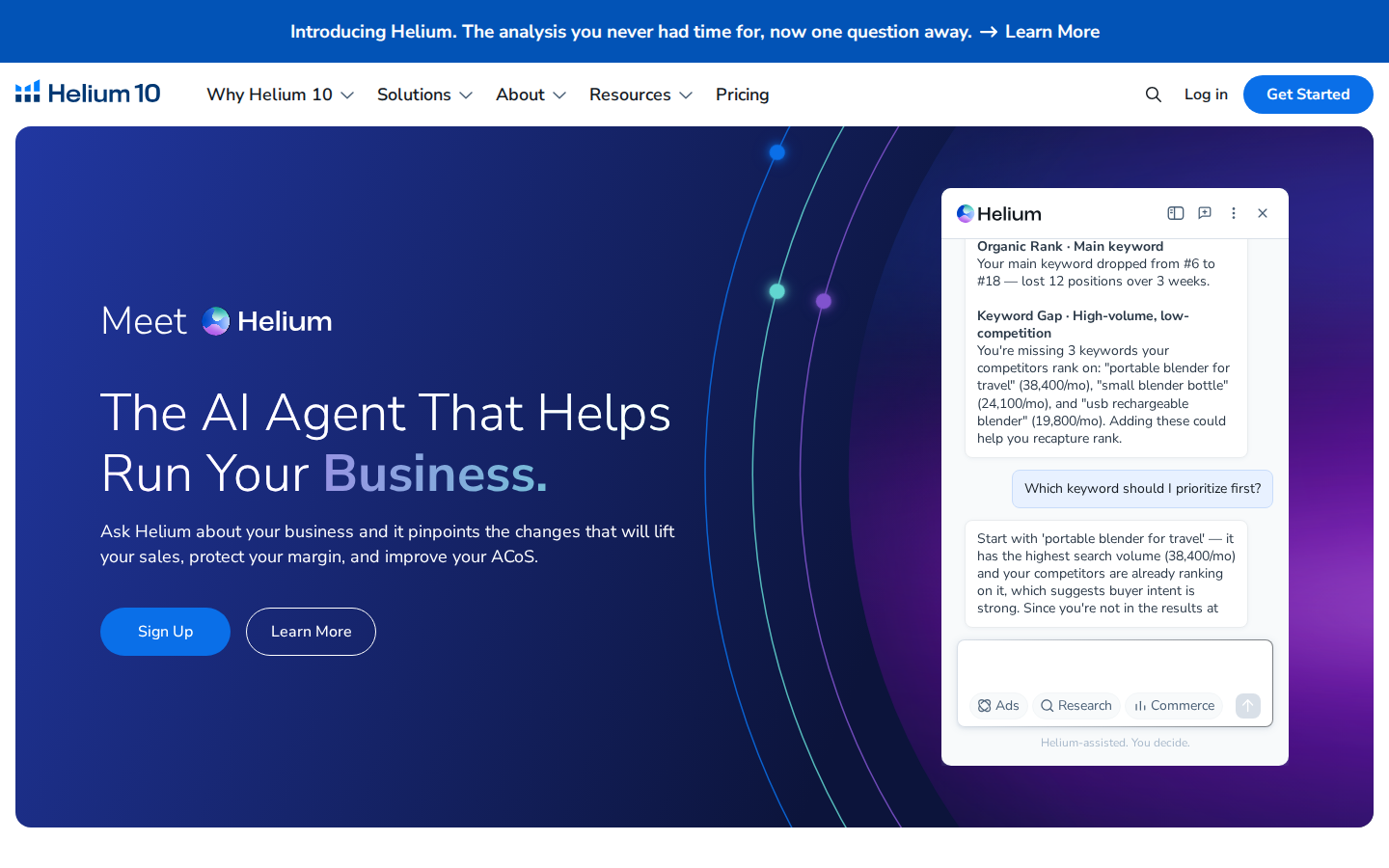
Helium 10 Alerts monitors listing changes and potential hijacker activity. Its documentation describes tracking areas including titles, product pages, prices, and Buy Box ownership.
For sellers who also need keyword research and listing optimization tools, keeping those functions within one platform can be convenient.
Why consider it: Your team wants listing monitoring alongside other day-to-day Amazon tools, or already uses Helium 10 and wants to evaluate its included alert functionality.
What to check: Confirm the monitored-ASIN allowance, supported marketplaces, alert types, and subscription requirements. Compare the plan you would actually purchase against your current monitoring setup.
Our take: A relevant option for sellers who want several functions under one subscription. Run a representative group of ASINs through a trial before moving critical monitoring workflows.

Best for product alerts and competitor monitoring
SellerApp’s Business Alerts supports notifications for prices, listing quality, ratings, Buy Box changes, and negative reviews. Its documentation describes using alerts for both your products and competitors’ products.
This makes it a useful candidate when your team wants to follow a defined collection of ASINs and respond to changes.
Why consider it: You want configurable product-level alerts, including competitor price movements and Buy Box events.
What to check: SellerApp’s help article describes daily email notifications. Verify the delivery cadence available in your plan if your team needs faster escalation.
Our take: A sensible shortlist option for product monitoring. During evaluation, check whether its alert thresholds produce information your team can act on without excessive noise.
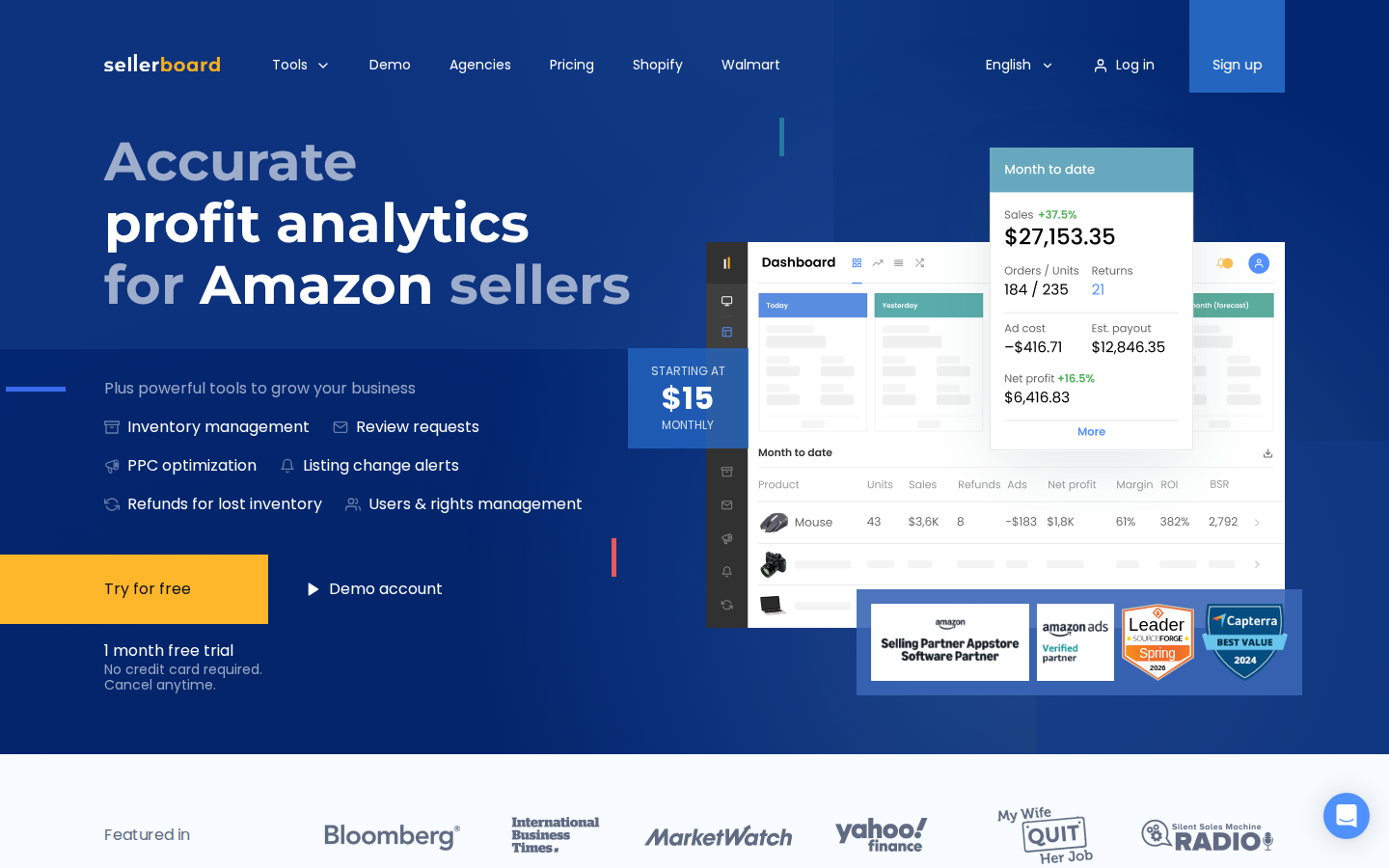
Best for organizing operational alerts
sellerboard’s alerts include listing title, description, main-image, category, variation, and suppression events.
Its Alerts dashboard helps teams review important events and manage their resolution status. Marking an alert as resolved records that status in sellerboard; it does not fix the underlying issue on Amazon.
Why consider it: Your team needs a practical way to review listing and account issues and keep track of what has been handled.
What to check: Confirm the alert types and notification settings relevant to your account. Its settings documentation notes that a long-term alert history log is not currently provided, which matters if you need a durable event record.
Our take: Worth evaluating for operational oversight, particularly when accountability for responding to alerts is as important as receiving them.
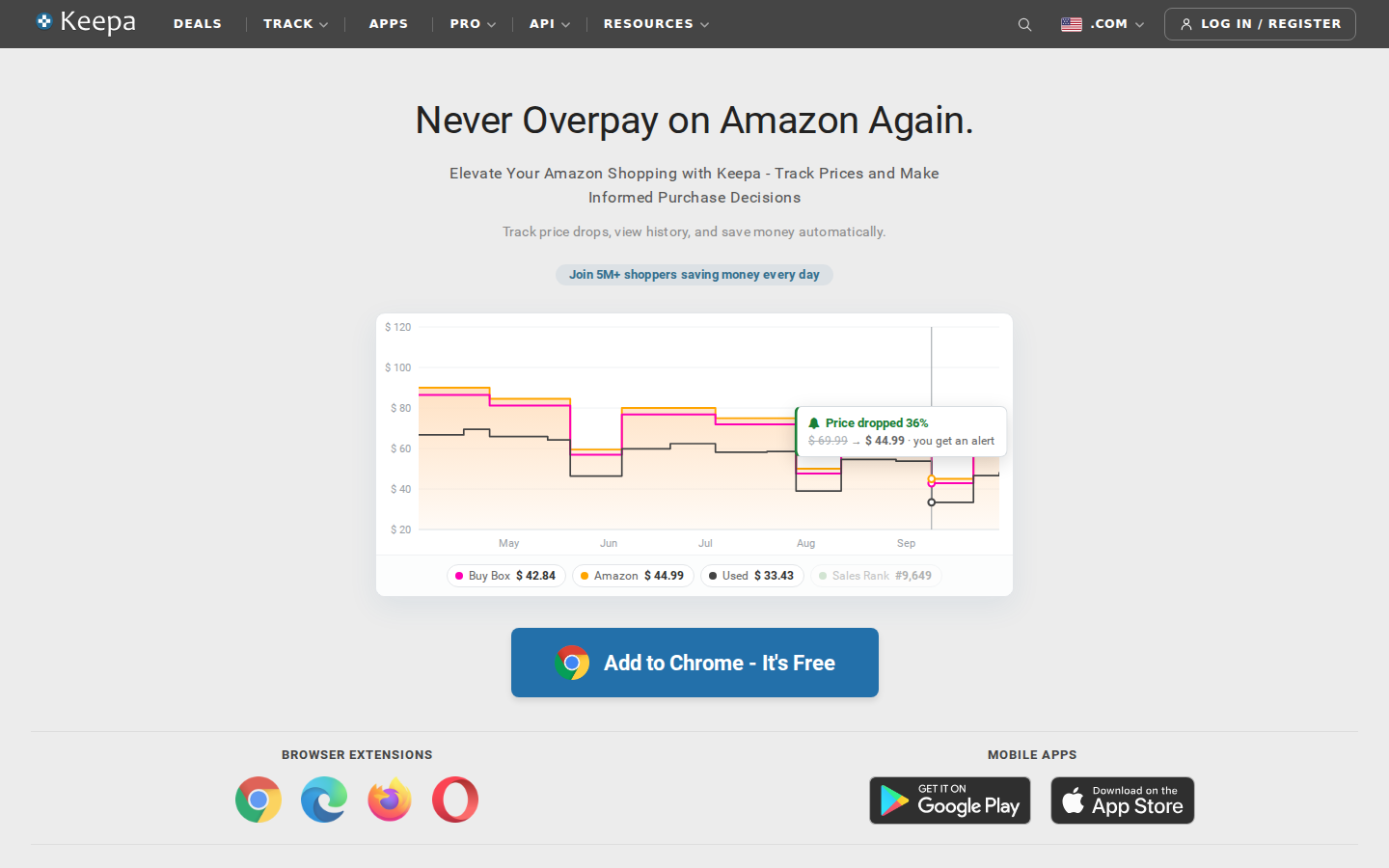
Best for Amazon price history and price alerts
Keepa specializes in Amazon price history charts and price-drop alerts. Its browser extension displays charts on Amazon product pages and supports price and availability watches.
Why consider it: Your primary question is how a product’s price has changed, or you want a notification when it reaches a target.
For example, a current discount is easier to evaluate when you can compare it with previous prices. That history can help you decide whether an offer deserves further sourcing research.
What to check: Confirm which data and tracking features require paid access. Price tracking alone should not be treated as a complete replacement for listing-health monitoring.
Our take: A focused choice for price research. Sellers who also need seller, brand, and category context can evaluate SmartScout alongside it.
For this comparison, the most useful distinction is the workflow you want to improve.
SellerSonar also offers competitive analytics, so the comparison is not simply “alerts versus data.” Ask each vendor to demonstrate your actual use case.
For example, have the team research the same brand, investigate the same competitor, and review the same set of listing events. The resulting workflow will tell you more than a feature count.
Write down your essential use cases before comparing subscriptions. “Monitor competitors” is too broad. “Notify our account manager when an important listing loses the Buy Box” is specific enough to test.
Separate urgent events from research tasks. They may deserve different tools and different review schedules.
A starting price does not reveal the cost of covering your business. Request pricing for your ASIN count, marketplaces, users, and required features.
For monitoring, ask about update frequency and notification delivery. For research, ask about historical access, exports, and usage limits. Avoid paying for a lower tier that excludes the capability driving your purchase.
Use a sample that includes your highest-value products, a few frequently changing listings, and relevant competitors.
During the pilot, record:
Where continuity matters, keep your current monitoring active during the evaluation. Move only after you have verified the replacement against your requirements.
If your main goal is understanding the competitive landscape, start with SmartScout. Its connected research approach is particularly useful when your questions extend across sellers, brands, products, and categories.
If your immediate requirement is listing monitoring, compare the relevant alert tools using your own ASINs and operational requirements.
Explore SmartScout to see how market intelligence can support your next Amazon growth decision.


