
Share of Voice

The One Chart That Answers "Are We Winning the Category?"

On Amazon, Search Is the Shelf. Share of Voice Measures How Much of It You Own.
Define a keyword set. SmartScout computes each brand's share of visibility across those terms, week by week, split into organic and paid, with the entire competitive set ranked side by side.
run a share of voice analysis
Available with the Enterprise plan
Search by Category
Filter Down to Products and Sellers
Search by Brand
The problem

Rank Trackers Answer the Wrong Question

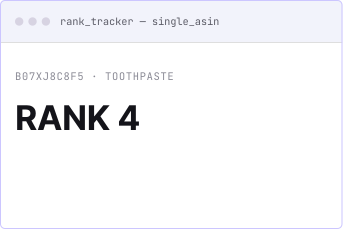
A rank tracker tells you where one ASIN sits on one keyword. That is useful, but it is not what your CMO is asking. The question at the top of the org is broader: of all the demand in this category, how much do we capture, how much does each competitor capture, and which direction is it moving?
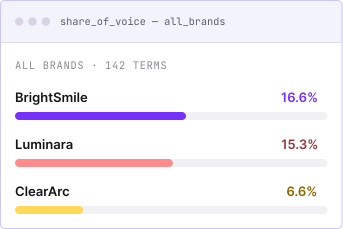
Share of Voice answers that question directly. The output is brand-level and trended, so it reads like a market share chart for search visibility. It is the digital shelf metric CPG teams already report on, computed continuously instead of assembled by hand from scattered rank reports.
Keyword discovery

Start From What You Sell, Not From a Keyword List

Most share-of-voice tools begin with a blank keyword field and hope you know which terms to paste. SmartScout starts from the entity you actually care about.
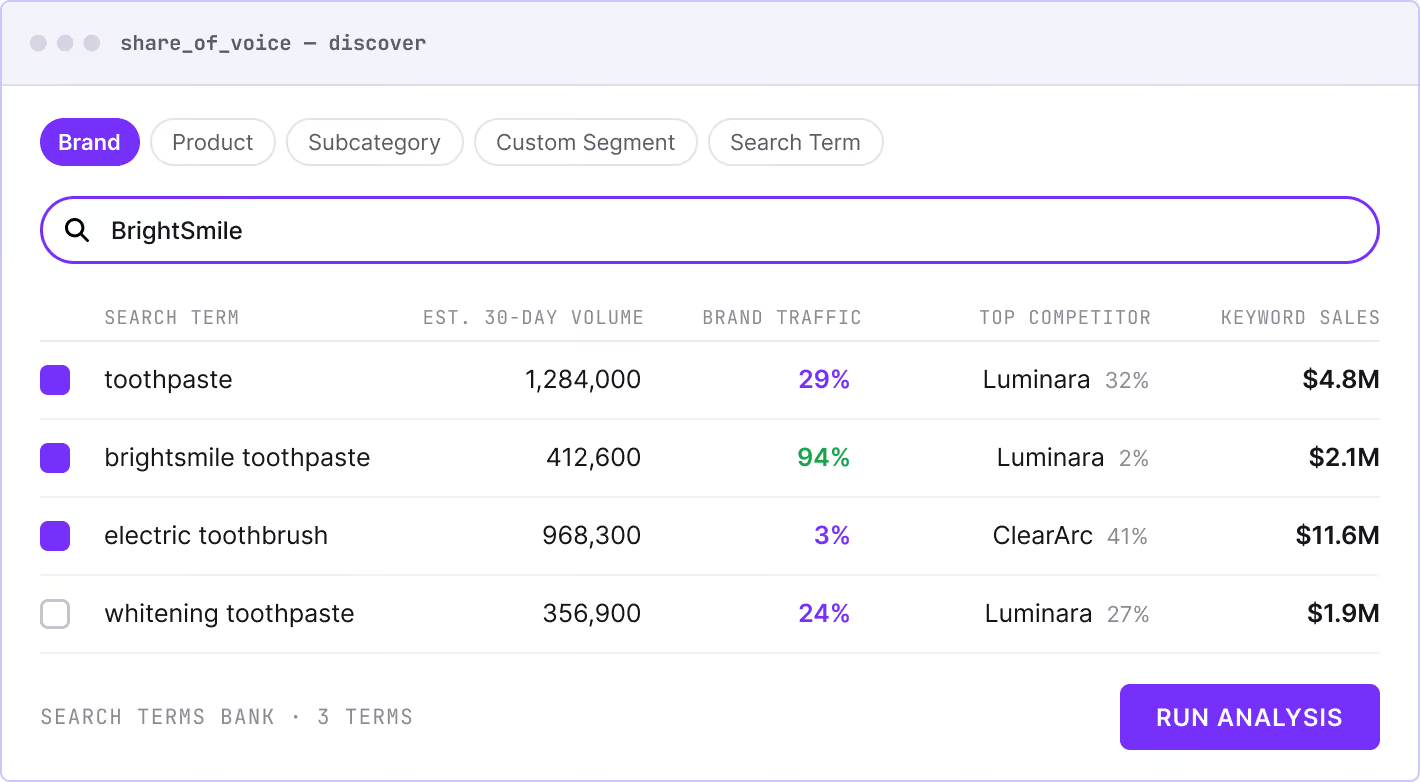
Search by Brand, Product, Subcategory, Custom Segment, or a seed Search Term, and SmartScout surfaces the keywords that matter. Each one comes with the context to decide whether it belongs:
You can see at a glance that your brand holds 29% of a high-volume generic term against a rival's 32%, owns your branded term outright, and captures only 3% of an adjacent category term where another player dominates. Terms you select accumulate in a Search Terms Bank. One click runs the full analysis.
This is the difference between a keyword list and a keyword strategy. The discovery step shows you what to measure and why it matters before a single chart loads.
Estimated 30-day search volume
The top competitor on that term and their traffic share
Total keyword sales
Your brand's current traffic share on that term
Four views

Four Views of the Same Fight

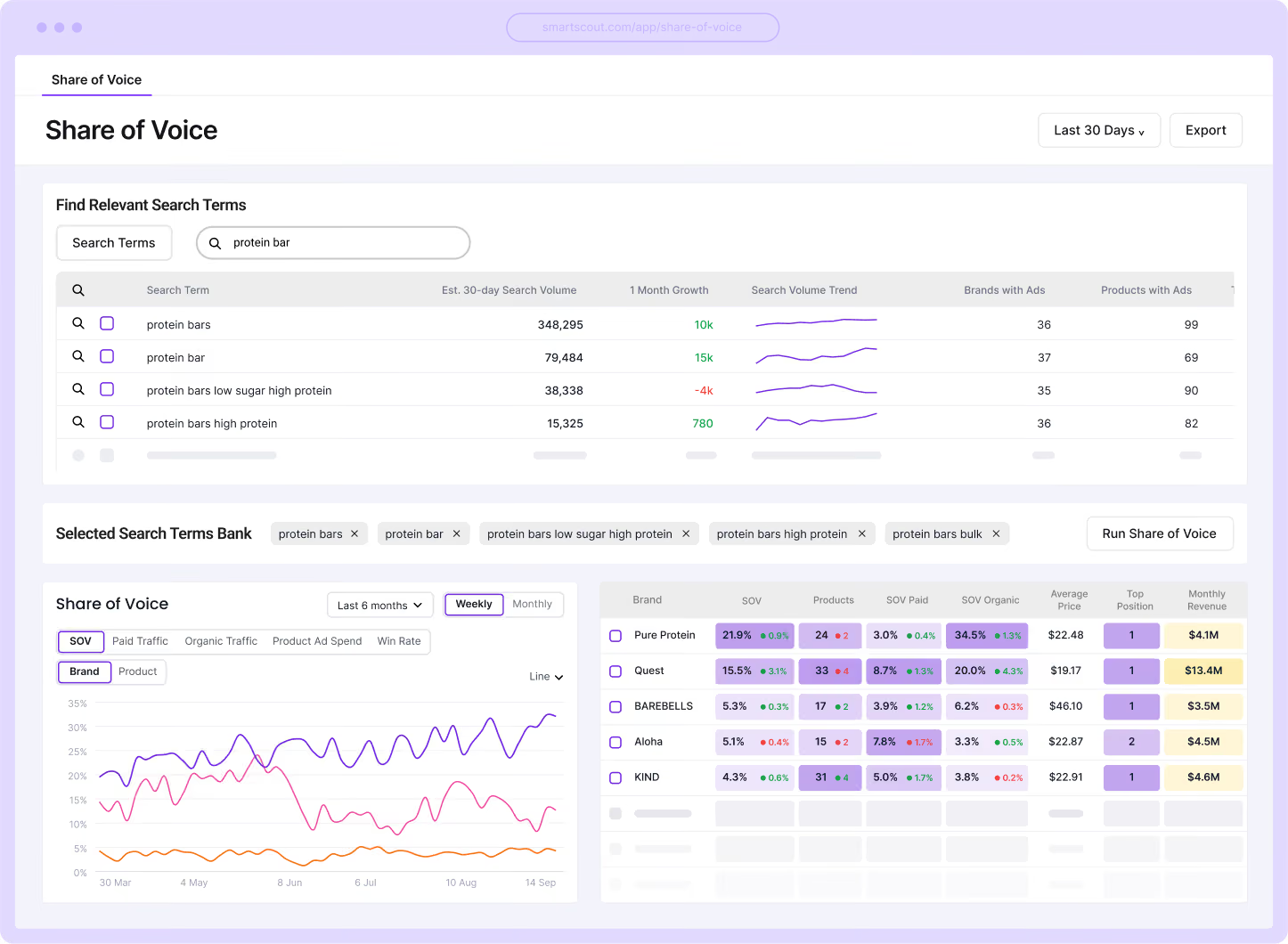
The results screen layers a trended competitive chart over a brand-level data table, with four lenses you switch between:
Overall SOV
The combined visibility number, organic and paid weighted together. This is the executive summary: who is winning, who is losing, and when the shifts happened.
Organic Traffic
Earned visibility only. Brands holding position without ad spend show up here. So do brands that just lost it.
Paid Traffic
Bought visibility. The brands spending their way onto the page, and how much of the search landscape they are purchasing.
Product Ad Spend
The money behind the paid position. This turns 'they have high paid SOV' into 'they are spending $X to hold it,' which changes the conversation about whether to compete on that term.
Each view supports brand-level or product-level granularity. Roll up to the brand fight for a
board deck, or drill into individual ASINs to see which products are carrying the weight.
Time controls run weekly or monthly across a configurable range, with full export.
Competitive table

The Competitive Table

Below the chart, every brand competing on your term set appears in a single table:
Share of Voice and its recent change
Product count on the terms
Paid and organic SOV split
Average price
Top search position
Monthly revenue
Country of origin
Check a brand on, it appears on the chart. Check it off, it disappears. Building the exact competitive view for a client deck or internal review takes seconds, not a round of spreadsheet formatting.
Ad spend overlay

See Whether the Spend Is Actually Working

Click any brand in the table and a focused overlay opens, plotting that brand's visibility directly against its advertising activity. Two toggles control the comparison:
Line
The visibility line. Share of Voice, Organic Traffic, or Paid Traffic.
Bars
The spend line. Total Ad Spend, or broken out by format and placement: Sponsored Brand, Sponsored Video, Top Group, Top Spot.
This is the efficiency question answered on one chart. Ad spend spikes through July and August while SOV holds flat? That is a finding that changes a budget conversation. Run the same overlay on a competitor and you are auditing their ad efficiency: whether their position is earned or bought, which formats they lean on, and what happens to their visibility when they stop spending.
Who it's for

Who Relies on Share of Voice

Channel owners
Channel owners reporting share-of-search alongside share-of-sales. The paid and organic split gives them the evidence to defend or reallocate ad budget with data instead of intuition.
Executives
Executives who need a single chart that tracks category position over time, exportable and ready for the quarterly review without an analyst rebuilding it from scratch.
Category analysts
Category analysts tracking competitive events. When a rival's paid SOV spikes on a key term, the ad spend overlay is one click away. When a new entrant appears in the organic rankings, the trend shows exactly when they arrived and how fast they grew.
Brand protection
Brand protection teams can monitor branded-term defense. Share of Voice shows who is conquesting your brand name, how much of your branded traffic they are siphoning, and whether your own position is holding.

Know Who Owns the Terms
That Drive Your Category

Define the keywords. See every brand's share, trended over time, split by organic and paid, with the ad spend behind each position one click deeper.
run a share of voice analysis
Available with the Enterprise plan
FAQ

Frequently Asked Questions

Have something else? Reach out to support@smartscout.com and we’d love to chat.

How does SmartScout find the right keywords to measure?

You start from a brand, product, subcategory, custom segment, or seed search term. SmartScout surfaces the relevant keywords with volume, traffic share, and competitor data attached, so you choose the term set with full context rather than guessing.

What is the difference between Overall SOV, Organic, and Paid?

Overall SOV is a weighted blend of organic and paid visibility. The organic and paid views isolate each channel so you can see which brands earn their position and which ones buy it.

Can I see how much a competitor spends on a term?

Yes. The brand overlay plots ad spend against visibility, broken out by Sponsored Brand, Sponsored Video, and placement type. You can see total spend and the specific formats driving their paid position.

How often is the data updated?

Share of Voice is computed on a weekly cadence, giving you a consistent trend line to track competitive movement over time.

Can I compare brands at the product level?

Yes. The analysis supports both brand-level rollups and individual ASIN views, so you can see which specific products are driving a brand's share on a given set of terms.

Does it cover branded and generic terms?

Both. Branded term defense and generic term offense appear in the same analysis. You can see whether competitors are bidding on your brand name and how your share on high-volume generic terms compares to the field.

Can I export the data?

The full competitive table and trend data export for use in reports, client decks, and internal analysis.

Which plan includes Share of Voice?

Share of Voice is available on the Enterprise plan.