.avif)
Going live on TikTok is one of the easiest ways to build real-time engagement with your audience.
For creators, it is a chance to connect with followers, answer questions, and grow a loyal community. For sellers, it can turn product demos, live Q&As, and limited-time offers into direct sales opportunities.
Here's a step by step guide on how to do TikTok Live, including what you need before you stream, how to go live from a mobile device, and how to stream from a PC using TikTok LIVE Studio or OBS. You’ll also learn practical tips for keeping viewers engaged, improving stream quality, and using live content more strategically as a creator or eCommerce seller.
Key Takeaways:
- Requirements: You need at least 1,000 followers and must be 18 years or older to unlock the LIVE feature and receive gifts.
- Mobile Streaming: Tap the + button, select LIVE from the bottom menu, add a compelling title, and hit Go LIVE.
- PC Streaming: Use TikTok LIVE Studio for an all-in-one desktop setup, or configure OBS Studio using your TikTok stream key.
- Best Practices: Start engaging immediately, use an eye-level camera angle, and ensure you have a highly stable internet connection.
Reasons Why You Should Stream
Massive Boost in E-Commerce Revenue
TikTok Live directly impacts your bottom line by enabling frictionless, in-app purchases. Live shopping drives 26% of TikTok's GMV with a 7.8% conversion rate. This outperforms the 2.1% rate of standard video ads. Going live creates urgency. Hosting flash sales and limited-time discounts pushes viewers to buy immediately.
Unrivaled Real-Time Engagement
Live streams offer a two-way conversation that static videos cannot match. Live video drives 38% higher engagement than pre-recorded content. Answering questions and acknowledging viewers by name builds trust, converting casual scrollers into loyal customers and boosting your visibility on the "For You" page.
Seamless Integration with Amazon FBA Strategies
TikTok Live is a powerful external traffic engine for Amazon sellers. Addressing pain points and demonstrating products live sends highly motivated buyers to your storefront, increasing conversion rates on your listing and improving organic ranking.
- Pro Tip: Use a product research tool to verify search volume and an FBA calculator to ensure your external traffic remains profitable after fees.
Better Product Discovery Than Static Images
Live streaming showcases the true scale and quality of your ASIN, eliminating buyer hesitation. Podbase data shows 76% of users who join a Live session make a purchase because authentic, real-time demonstrations provide ultimate social proof. Conduct Amazon competitor analysis beforehand to clearly highlight on stream why your product beats the competition.
What You Need Before You Stream on TikTok
Before you set up your camera and start engaging with your audience, TikTok enforces strict eligibility rules to maintain platform quality.
Here is exactly what you need to have in place before you can go live.
How to Do TikTok Live on a Mobile Device
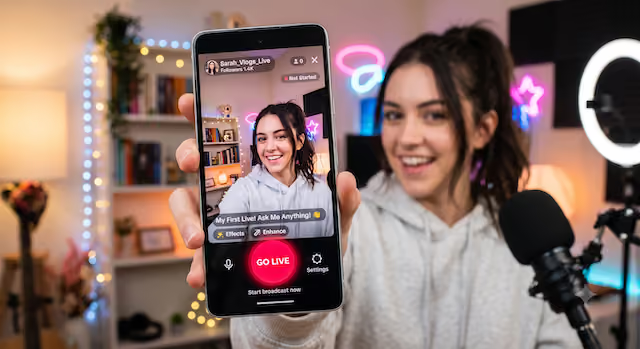
Most creators start on mobile because it requires minimal gear. Here is how to start your first broadcast:
Open the App: Launch TikTok and tap the + (Add Post) button at the bottom center of your screen.

Select LIVE: Swipe through the bottom menu options (Post, Create, Live)

Set Up Your Stream: * Add a Title: Keep it under 32 characters. Use a specific hook like "Live Product Q&A" rather than a generic "Going Live."
Choose a Category: If you are streaming mobile games, select the gaming category.
Adjust Settings: Tap the three dots to manage your mic, mirror your camera, or add moderators. You can also set a live goal to incentivize viewers to send gifts.
Go LIVE: Once your lighting is dialed in and your internet connection is stable, tap the red Go LIVE button.
How to Stream on TikTok from a PC
Streaming on TikTok from a PC gives you more control than going live from your phone. It is especially useful if you want to stream gameplay, share your screen, use a webcam and microphone setup, or create a more polished broadcast with overlays and scenes.
To stream from a desktop, you can use TikTok LIVE Studio for a simple all-in-one setup or OBS Studio if you already have access to a TikTok stream key. In this section, we’ll walk through both options so you can choose the setup that fits your content, technical comfort level, and streaming goals.
Option A: TikTok LIVE Studio (Recommended for Beginners)
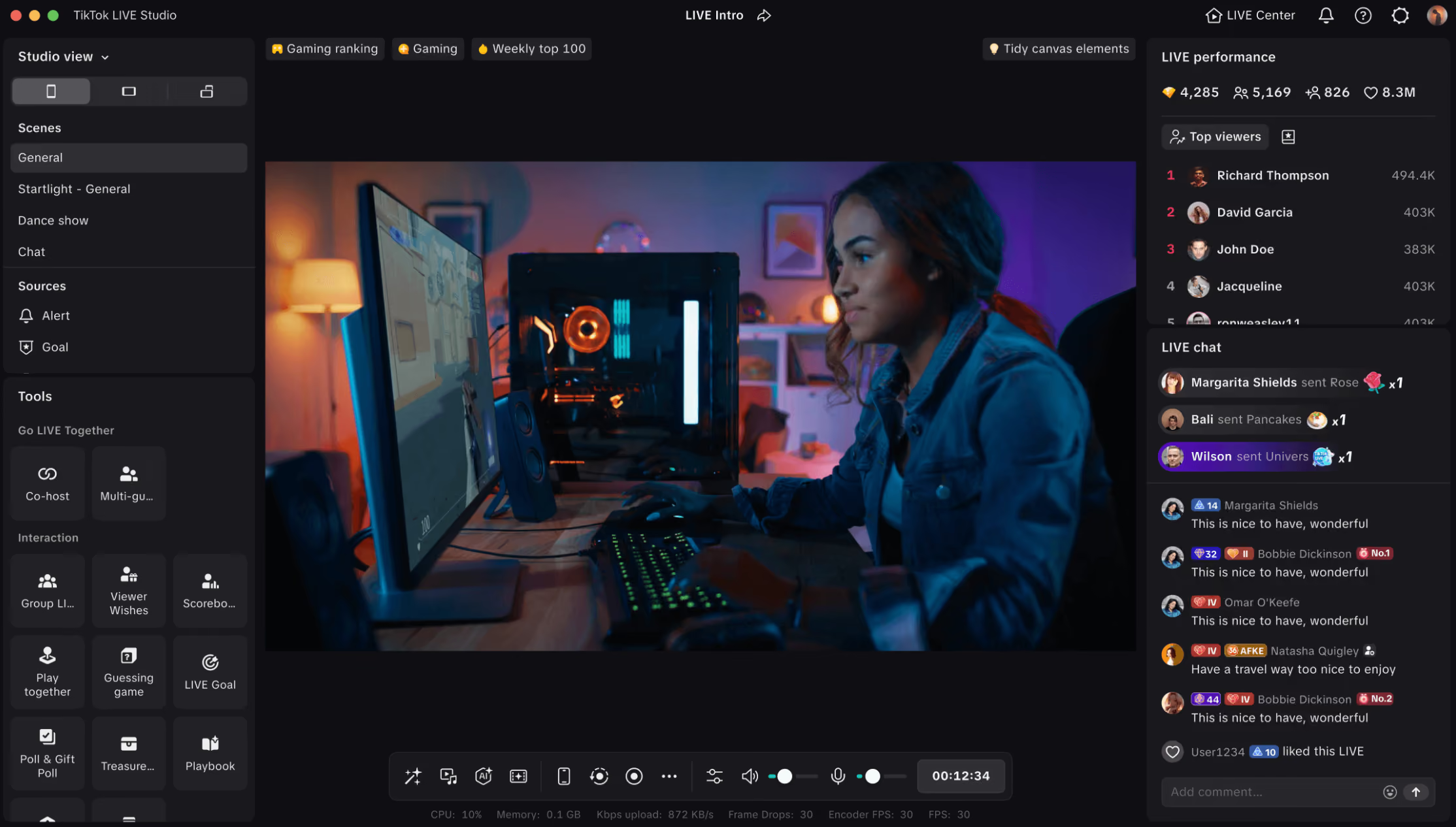
TikTok LIVE Studio is a free application that makes PC streaming incredibly simple.
- Download the software and log in.
- Add your display capture, webcam, and microphone using the built-in scene templates.
- Adjust your stream quality (1080p at 60fps is highly recommended if your connection allows it).
- Manage your chat and moderation tools directly within the same window.
Option B: OBS Studio (For Advanced Users)
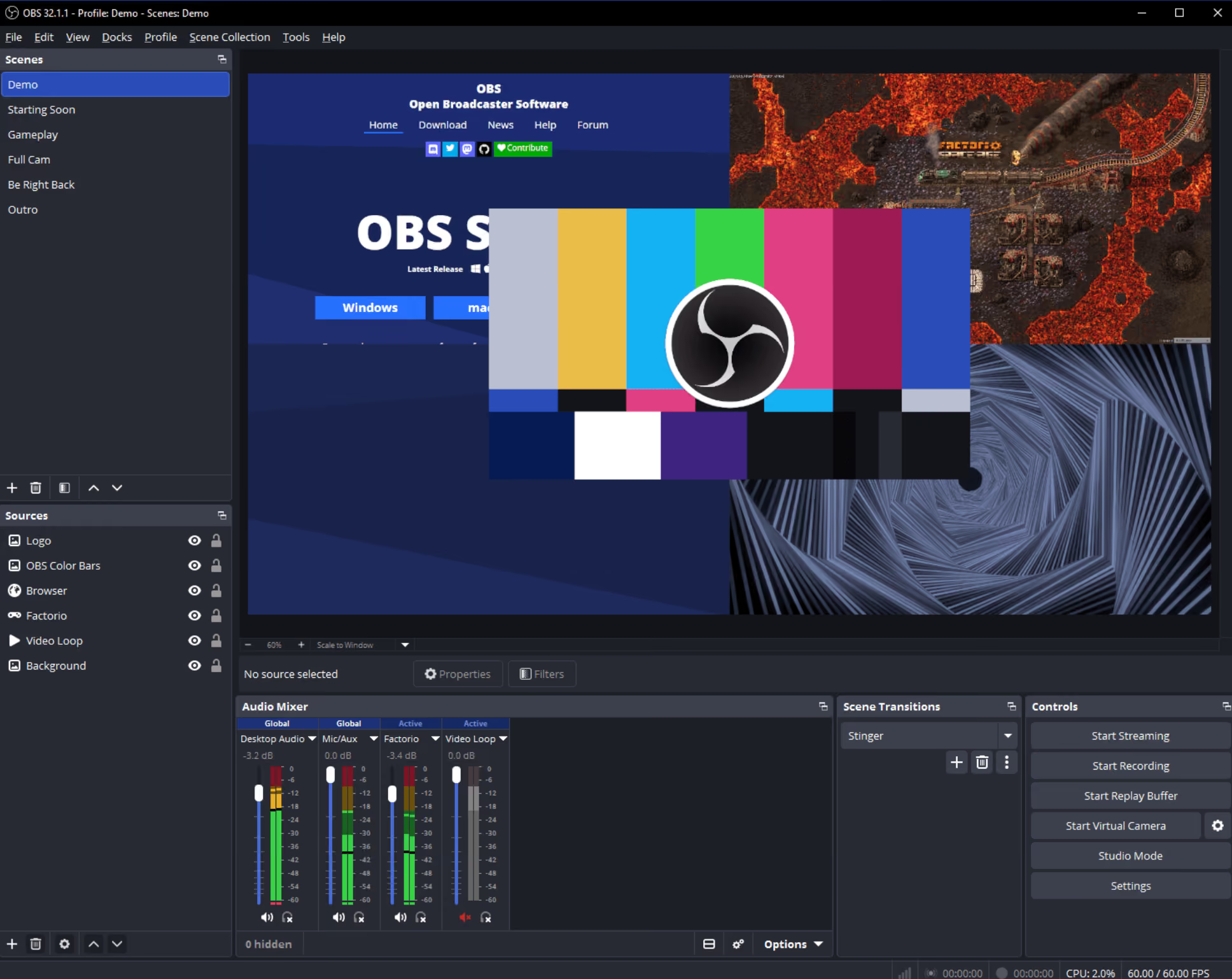
If you already use OBS for Twitch or YouTube, you can route it to TikTok.
- Locate your TikTok Server URL and Stream Key (found in the TikTok Live Center on desktop).
- Paste these credentials into the Custom Stream Server settings in OBS.
- Note: Keep your stream key private. If leaked, anyone can broadcast to your account.
TikTok Live Monetization Mechanics
Going live isn't just about building a community; it is a direct avenue for generating revenue. TikTok offers robust, built-in monetization tools that allow you to earn money natively during your broadcast.
Here is how the two primary income streams work.
TikTok Shop Integration
For e-commerce sellers, integrating TikTok Shop is the most lucrative monetization strategy. This feature allows viewers to purchase your products directly within the app, creating a frictionless buying experience.
Here is exactly how to pin a product to your live stream:
Link Your Shop: Ensure your TikTok Shop or affiliated store is fully set up and linked to your creator account before broadcasting.
Access the Product Tool: While setting up your LIVE (or during the broadcast), tap the Shopping Bag icon on the screen.
Select Your Items: Choose the specific products from your catalog that you will be discussing or demonstrating during the stream.
Pin to Screen: Tap Pin next to a product to highlight it. A small, clickable product card will appear on the viewer's screen.
Direct the Traffic: Tell your audience to click the pinned card. They can complete their checkout seamlessly without ever leaving your live stream.
Seller Tip: Do not just pin a product and hope for the best. Use an FBA calculator to understand your true margins, and run exclusive, time-sensitive "Live Only" flash sales to create extreme buying urgency.
Virtual Gifts and Diamonds
Even if you aren't actively selling a physical product, you can monetize your live stream through TikTok's virtual gifting economy.
LIVE Gifts let viewers support creators during a TikTok LIVE. When you turn on LIVE Gifts and start streaming, viewers can send virtual Gifts that appear on the screen in real time.
These Gifts are a way for viewers to react to your content, show appreciation, and help make your LIVE more engaging. As your LIVE becomes more popular, TikTok may award you Diamonds based on the activity and support your stream receives.
After your LIVE ends, you’ll see the total number of Diamonds collected in your LIVE summary. Receiving Gifts and collecting Diamonds must follow TikTok’s virtual items policies.
Here is how the mechanics of gifting work:
Viewers Buy Coins: Users purchase virtual "Coins" using real money through the TikTok app.

Viewers Send Gifts: During your stream, viewers can use their Coins to send you digital animations (Gifts), ranging from a simple "Rose" to massive screen-covering animations.

You Earn Diamonds: When you receive a Gift, TikTok awards your account with "Diamonds." Diamonds are the metric TikTok uses to measure a creator's popularity and content quality.
Converting to Cash: Once you accumulate enough Diamonds, you can withdraw them for fiat currency via PayPal or a linked bank account. TikTok takes a percentage of the revenue (typically around 50%) during this conversion process.
As long as your account meets the eligibility requirements outlined earlier, you can withdraw your Diamonds for fiat currency. To maximize this income stream, set up "Live Goals" before you start broadcasting. Reminding your audience of these goals throughout the stream is a proven way to incentivize more Gifts.
TikTok LIVE replays
TikTok LIVE replays are saved recordings of your previous LIVE videos. You can view, download, or clip them for up to 30 days after your stream ends.
TikTok saves LIVE videos so creators can access their replays, download past streams, or turn highlights into clips. These recordings also help TikTok improve content moderation and respond to content that may violate its Community Guidelines.
To find your LIVE replays, open the TikTok app and go to your Profile. Tap the Menu button at the top, then select TikTok Studio. From there, tap LIVE, then choose LIVE recordings.
You can also access your LIVE replays through the LIVE Center.
FAQs
Can I go live on TikTok with less than 1,000 followers?

Generally, no. TikTok strictly requires 1,000 followers for native live streaming. Some third-party software claims to bypass this, so proceed with caution as this can risk your account standing.
Why is my TikTok Live lagging?
TikTok Live is highly demanding on your internet bandwidth. Always prioritize a stable Wi-Fi connection over cellular data, and close background apps on your device before starting your stream.
What is the best way to get people to watch my stream?
Promote your stream beforehand using TikTok stories. When you are live, engage with the chat immediately and do not wait for the room to fill up before you start talking.
How long should a TikTok Live be?
A good TikTok Live can run anywhere from 20 minutes to an hour, depending on your topic and audience. For beginners, start shorter and focus on keeping the conversation active.
How often should I go live on TikTok?
Consistency matters more than going live every day. Try starting with one or two scheduled live sessions per week, then increase if your audience responds well.
What should I talk about on my first TikTok Live?
Start with a simple topic your audience already cares about. You can answer common questions, show behind-the-scenes content, demo a product, or talk through tips related to your niche.
Can I go live on TikTok without showing my face?
Yes, depending on your content. You can stream gameplay, product demos, screen shares, tutorials, or behind-the-scenes footage without making your face the focus.
How do TikTok Live gifts work?
TikTok Live gifts let viewers send virtual gifts during your stream. Eligible creators can receive gifts and convert them into rewards, but availability depends on TikTok’s age, account, and regional requirements.
Can I add moderators to my TikTok Live?
Yes. Adding moderators helps you manage comments, block spam, and keep the stream focused. This is especially useful for sellers, creators with active chats, or longer live sessions.
Can I reuse TikTok Live content after the stream?
Yes. You can turn strong moments from your Live into short clips, product demos, FAQs, or follow-up TikTok posts. This helps you get more value from one live session.
.png)