To launch a new product on Amazon with less wasted spend, start from your competitors' ad data instead of a blank keyword list. It shows which search terms your category already pays for, who holds the sponsored placements and where the openings are, so your first campaigns are built on evidence from the market rather than guesses.
A new listing has no history to learn from. Your competitors do, and most of it is visible if you know where to look.
Why Competitor Ad Data Beats Guesswork at Launch
The Core Launch Problem: No History
A brand new ASIN has no search term report, no conversion rate and no organic rank. Every keyword and bid decision in the first weeks is a guess.
Most sellers fill that gap with a keyword tool's volume list and Amazon's suggested bids. Volume tells you how many people search a term. It doesn't tell you whether those searches buy a product like yours, or what it costs to be seen on them.
So the typical launch spends its first month buying data the category already holds.
What Competitor Data Tells You That a New Account Cannot
Established brands in your category have been paying for clicks for months or years. Their ad activity answers questions your new account can't yet:
- Which terms they keep funding. A brand that pays for the same term month after month is telling you the term is worth something to them. That isn't a guarantee it will work for you, which is why you still test, but it's a far better starting signal than raw volume.
- Which placements are contested. Terms where several brands fight for the top of search will be expensive to win at launch.
- Where nobody advertises consistently. Gaps in sponsored coverage are often cheaper visibility.
- Who owns the category organically and who is buying their position. That tells you how much of the market is held by ad spend rather than rank.
Read the Category Before You Spend
Use Subcategory and Brand Share to See Who Owns Demand
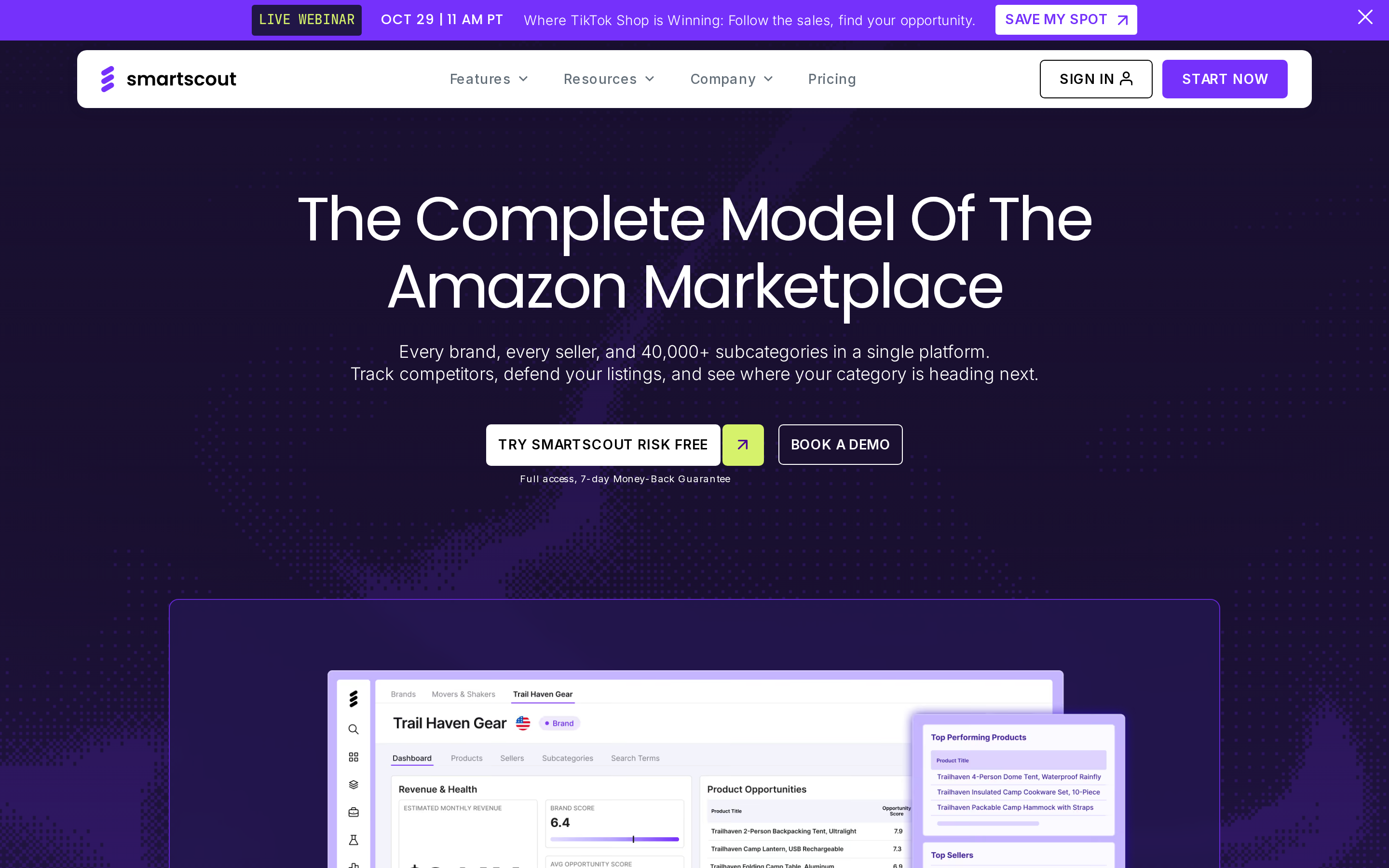
Amazon's public browse tree is too broad to plan a launch on. SmartScout breaks the catalog into more than 40,000 subcategories, each with revenue, brand count, review depth and price data, so you can see the market your product actually competes in.
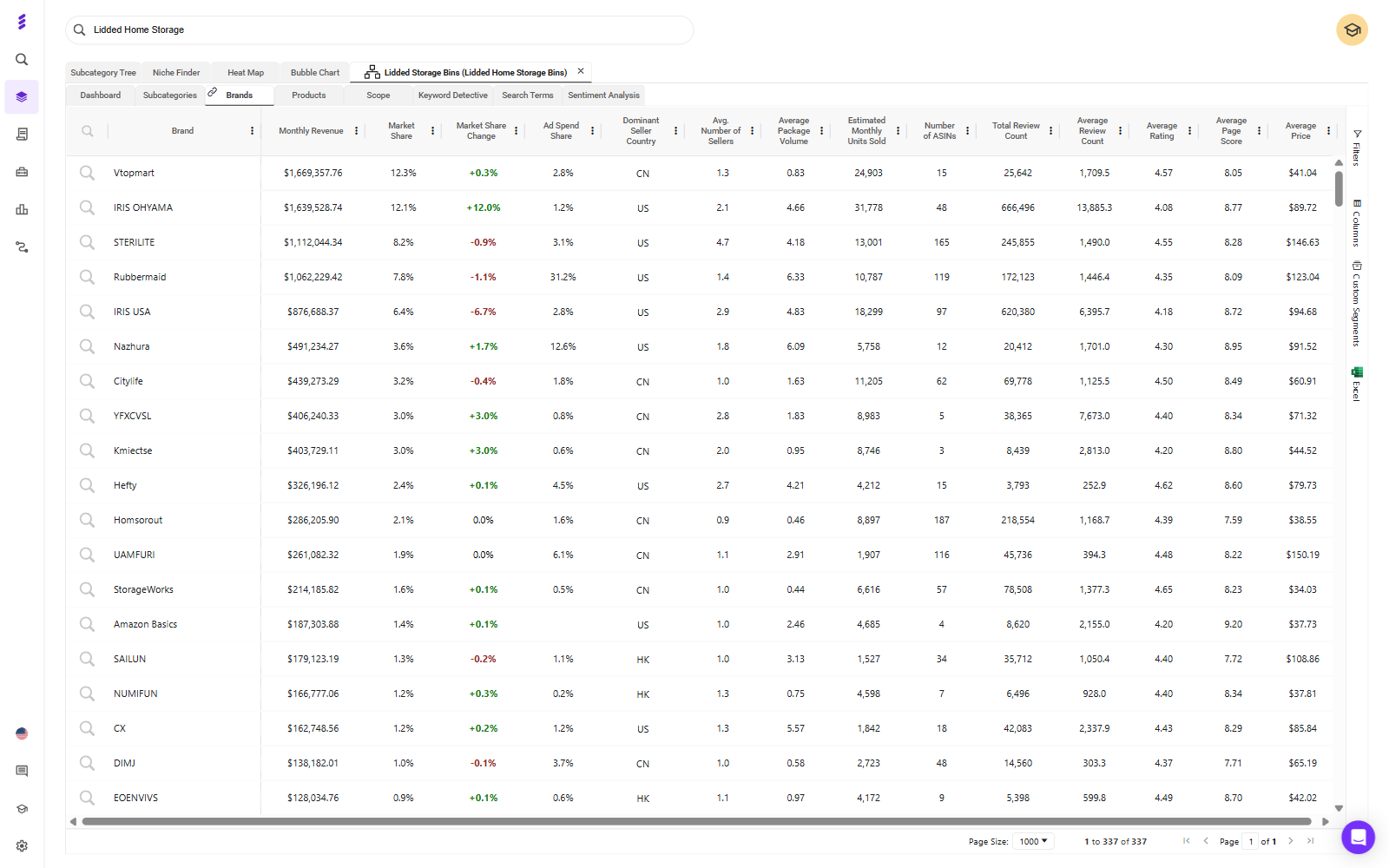
Open your target subcategory and go to its Brands view, which lists every brand selling there with its estimated revenue, market share and share of the subcategory's ad spend.
What to look for:
- Ad spend share against market share. This is your first look at competitor ad data. In the example above, one brand holds under 8% of the subcategory's revenue but over 30% of its estimated ad spend. That brand is buying its position, and a brand whose ad spend share runs well below its market share is holding its position organically.
- Concentration. If one or two brands hold most of the revenue, the head terms belong to them for now. Plan to enter through the segments they don't serve well.
- Fragmentation. If share is spread across many brands, no one owns the shopper yet and a well-built listing has room.
- Review depth. If the top products carry thousands of reviews and you're launching with none, expect broad terms to convert poorly until you've built a review base.
- Amazon's own share. If Amazon sells heavily in the subcategory, factor that into your pricing and your expectations.
Separate the Winnable Gaps From the ASINs You Can't Beat Yet
Not every competitor is a target. Sort them into two groups before you spend anything.
- Winnable gaps: segments where the leading products rate poorly, are priced above you, or leave a variant, size or pack count uncovered.
- ASINs you can't beat yet: strong ratings, deep reviews and a lower price than yours. Attacking these at launch means paying to be compared against a better offer. Come back to them once your listing has reviews.
Finish this step with a short list: your target segment, the 3 to 4 competitors shoppers will compare you with, and the ones to leave alone for now.
Build the Keyword Set From Your Competitors' Best Terms
Pull the Terms Your Top 3 to 4 Competitors Rank and Pay For
Use three views together: one for what the category searches and pays for, one for what each competitor ranks on, and one for where they overlap.
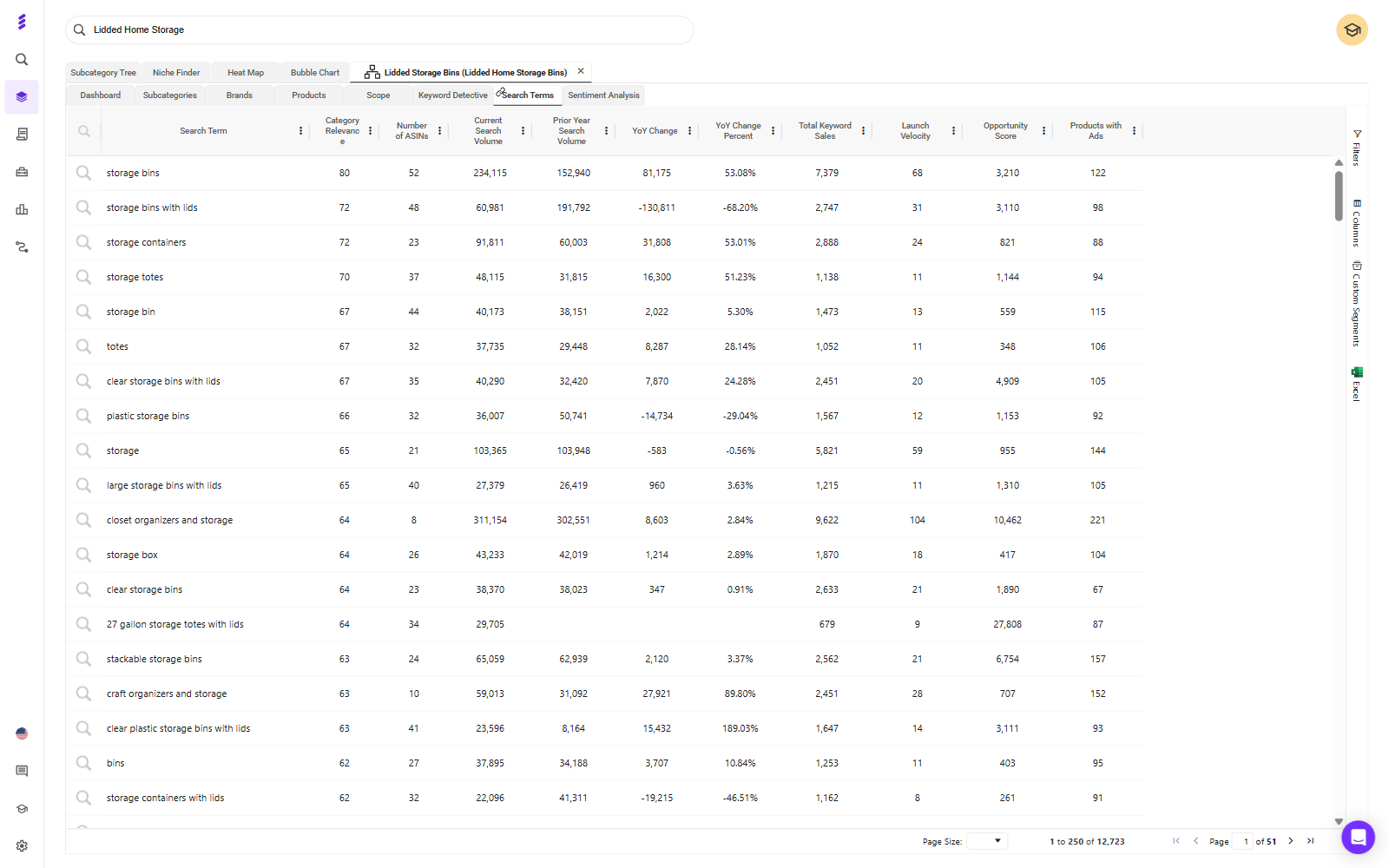
Search Terms for the category. Inside your subcategory, the Search Terms view lists the terms shoppers use to find these products, with search volume, year-on-year change and how many products advertise on each one.
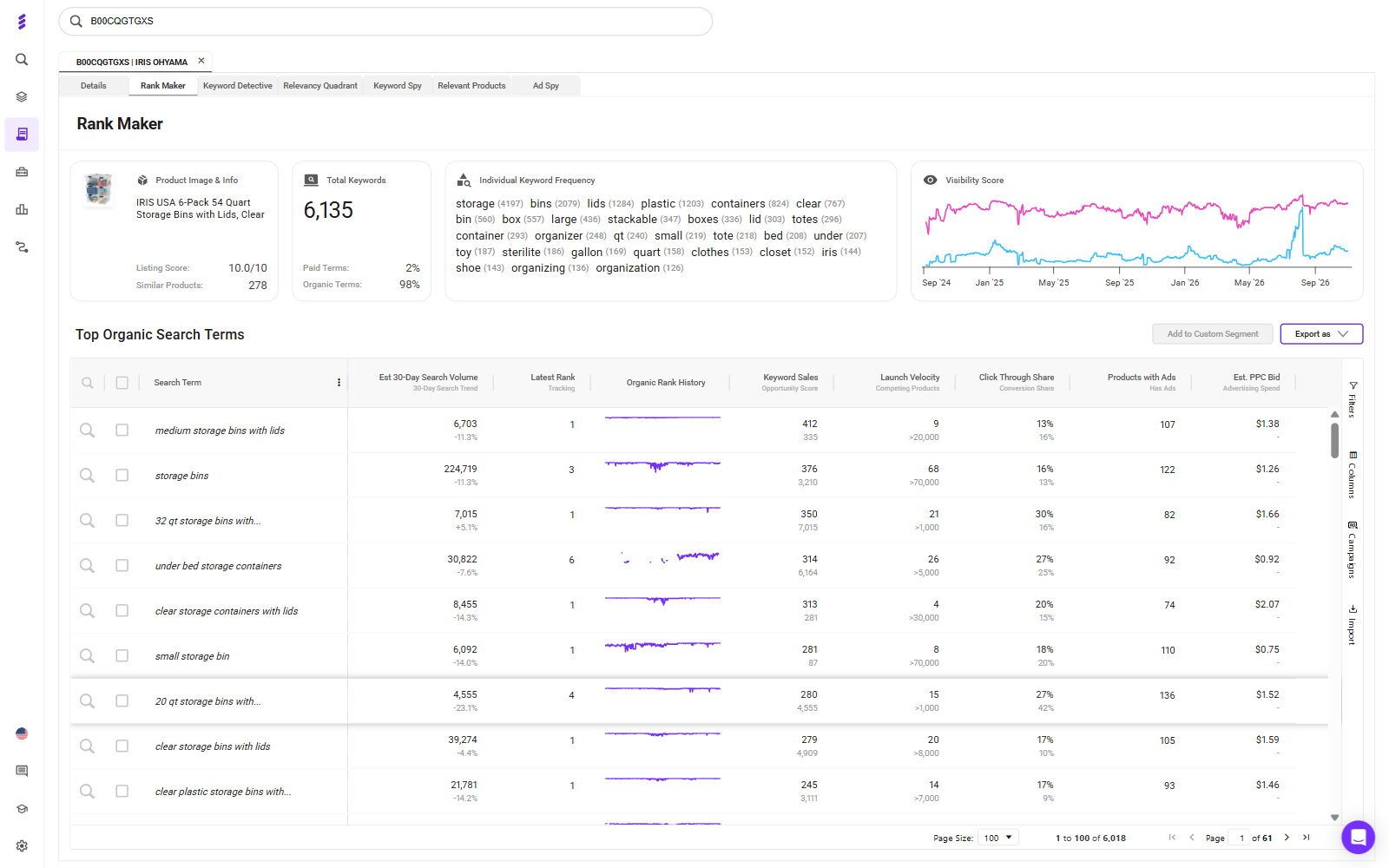
Rank Maker for each competitor. Run a competitor's main ASIN through Rank Maker to see the keywords it ranks for, how its terms split between paid and organic, its organic rank history and an estimated PPC bid for each term.
Keyword Spy for the overlap. Keyword Spy lines up the relevant search terms against the organic ranks of competing ASINs, so you can see which terms several competitors rank on at once.
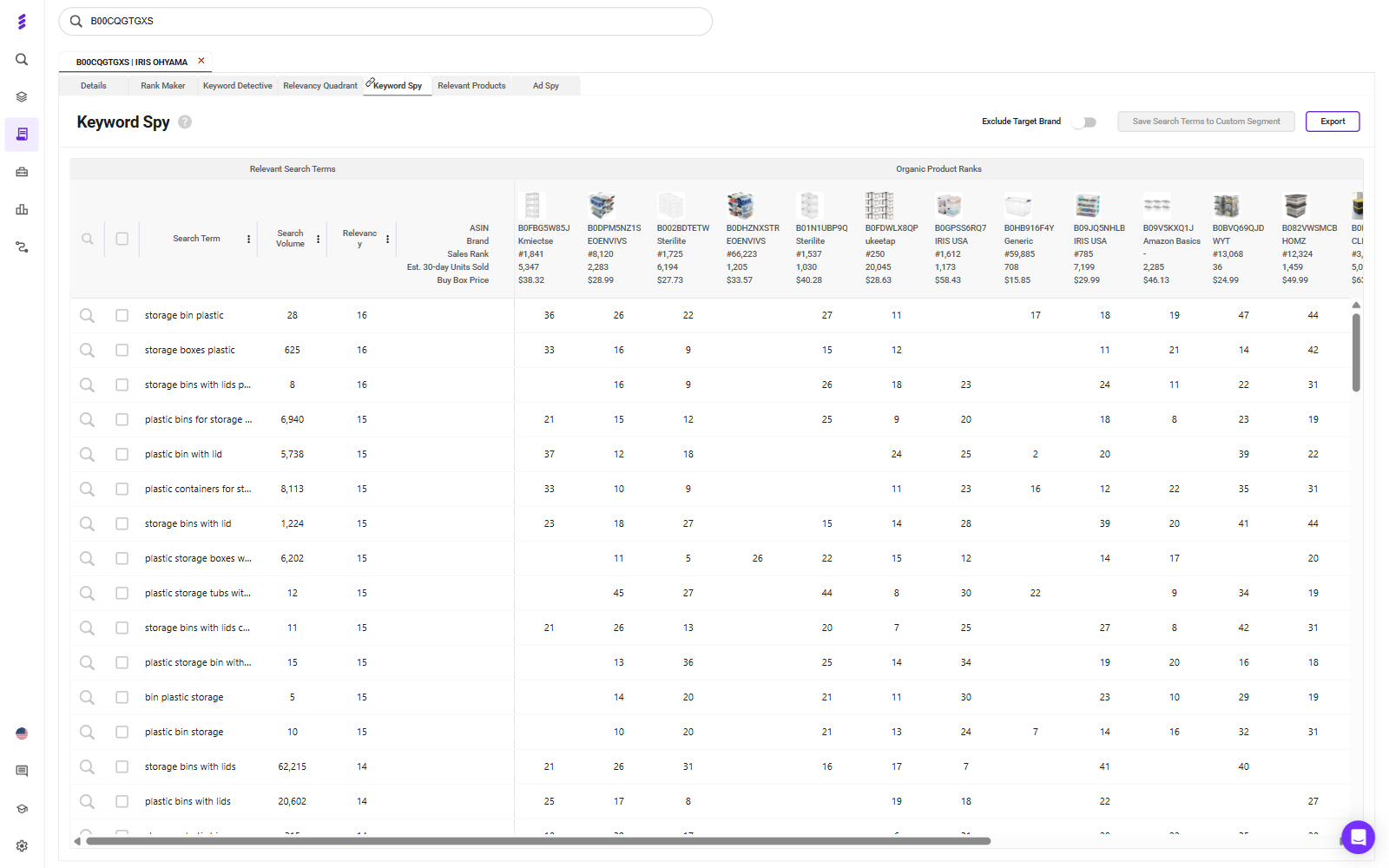
The strongest launch candidates are the terms that appear across several competitors and still carry heavy ad competition. A term brands already rank on and keep paying to defend is one they clearly value.
On an Enterprise plan, SmartScout's Ad Spy goes a step further: enter a competitor brand and you see its paid search terms, the estimated searches on each, and how often it wins Sponsored Products, Sponsored Brands and top-of-search placements. Its spend numbers are estimates built from search volume, CPC, placement win rates and average click-through rates, and they leave out page two, Sponsored Display, product page targeting and DSP.
Treat every ad spend figure as an estimate, the ad spend share in the Brands view included. Use them to compare competitors against each other, not to set your budget to the cent.
Bucket by Job: Head, Mid-Tail and Long-Tail
Every term on the list has a different job at launch:
- Head terms buy visibility at poor efficiency. Keep them small at launch, or hold them back until you have reviews.
- Mid-tail terms are where intent and conversion usually sit. These are the core of your launch.
- Long-tail terms are cheap volume with little competition. Let them feed your discovery campaigns.
Run a Relevance Check Against Your Own Listing
Before a term goes into a campaign, compare it with your listing. If a shopper searching that term would pick the competitor's product over yours on the results page, don't buy the click.
A competitor might rank for "with lid" or "pack of 6" because its product has those features. If yours doesn't, cut the term. A lower bid doesn't fix a mismatch between the search and the product.
Structure the Launch Campaigns
Fix the Listing Before You Buy Traffic
Ads send shoppers to your product detail page. They can't make that page convert. Get the images, title, bullets and A+ content right before any campaign goes live.
Reviews are the real early constraint for most launches. If your product is eligible, Amazon Vine is the cleanest way to get the first reviews in front of shoppers.
Give Each Match Type Its Own Campaign
Run Exact, Phrase, Broad and Auto as separate campaigns, never mixed in one. When they share a campaign, spend drifts to Broad, Exact gets starved and the reporting loses the signal you need to set bids.
Keep branded and non-branded terms in separate campaigns as well. They do different jobs, and blending them hides what your acquisition spend is actually doing. There's a fuller breakdown in this guide to Amazon PPC campaign structure.
Pair Low-Bid Discovery With a Tight Exact Campaign
Set the launch up in two layers:
- Discovery: Auto and Broad campaigns at low bids. These let Amazon show you how it understands your product. In the Auto campaign, Amazon lets you set separate bids for close match, loose match, substitutes and complements, and they behave differently enough that they're worth bidding on separately.
- Exact: a small campaign on the 5 to 10 overlap terms from your competitor research that you're most confident about. Give it higher bids and a protected budget.
Use Competitor Pages as Ad Placements
Target Competitor ASINs Only Where You Win the Comparison
Product targeting puts your ad on a competitor's detail page, where the shopper compares you side by side. That works when you win the comparison they're making: price, review count, star rating or pack size. If you're the weaker offer on that page, you're paying to advertise their product.
SmartScout's Traffic Graph maps which products shoppers move between, through frequently bought together and also-viewed links. Run it on your main launch keyword and it shows the product pages that already carry the shoppers you want, which makes them natural candidates.
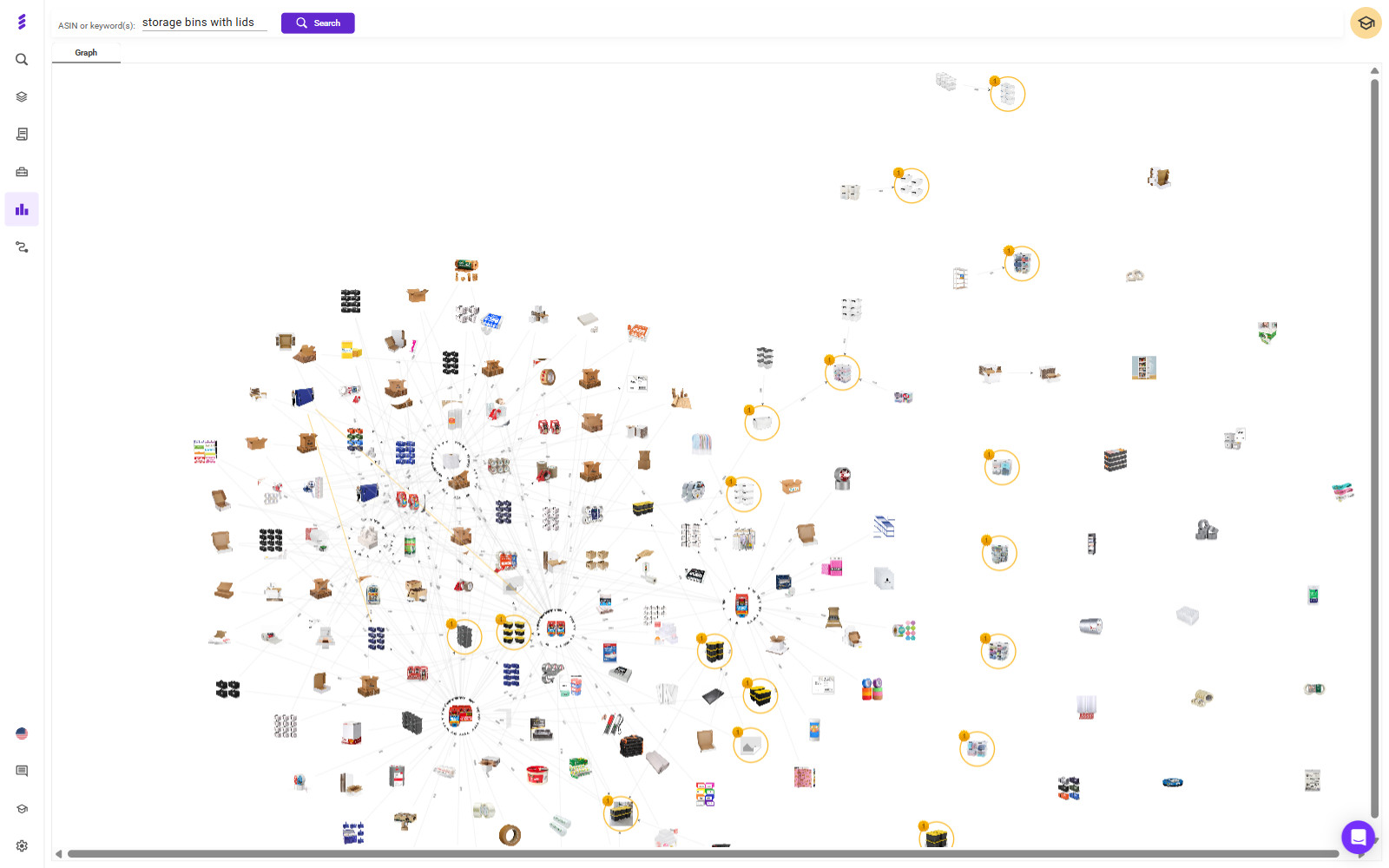
Two more points:
- Target the weak segment of a category. Category targets can be refined by brand, price and star rating. Aim at competitors rated under four stars, or priced above you, rather than the whole category.
- Start small and judge on conversion. SmartScout's ad estimates don't cover product page targeting, so you won't see what competitors spend there. Click-through rates are naturally lower on detail pages than in search, so judge these campaigns on conversion and return on ad spend, not CTR.
Defend Your Own Detail Page
Once you're live, target your own ASIN pages too. It's cheap, and it keeps the ad slot under your product from going to a competitor at the moment the shopper is deciding. If you sell complementary products, this is also where they cross-sell.
Bid and Harvest in the First 30 Days
Accept Bad Efficiency Early
For the first month you're buying two things: rank and data. Your ACoS will look poor, and that's expected.
Move bids in small steps, around 10 to 15% every two to three days, so you can tell which change caused which result.
Harvest Converters Into Exact, Then Negate Them at the Source
Once a week, pull the search term report from your Auto, Broad and Phrase campaigns:
- Move search terms that convert into your Exact campaign.
- Add those same terms as negative exact in the campaign they came from, so you aren't paying for the same search in two places or losing control of which campaign serves it.
- Add negative phrase targets for whole themes that are clearly irrelevant.
Give discovery time to work. Amazon suggests letting a new automatic campaign run for about two weeks before you build manual campaigns from its data.
Agree the Kill Criteria Before Spend Starts
Decide before you spend: what conversion rate, by what date, at what spend, and what happens if you miss it. Fix the listing, change the price, pause or liquidate.
Apply the same discipline to individual terms. At a 10% conversion rate, 10 clicks should produce about one order. Give a term two to three times that before you judge it, then pause it rather than shaving the bid forever.
The worst launches I've seen had no stop condition. They ended by attrition, long after the data had made the answer clear.
Measure the Launch on TACOS, Not ACoS
Why ACoS Should Look Bad During a Launch
ACoS is ad spend divided by ad sales. During a launch you're paying for rank that will later earn organic sales, and ACoS gives that spend no credit for them.
TACOS is ad spend divided by total sales, ads and organic together. If the launch worked, organic sales grow and TACOS falls over the following months, even while ad spend holds steady. That falling line is the proof. You can track it with a free TACOS calculator.
Neither number is the goal, though. Profit is. A 30% ACoS is healthy on a product with a 50% margin and a loss on one with a 20% margin, so know your margin before you set any target.
Track Organic Rank on Your Launch Terms as the Leading Indicator
Sales lag visibility. Once you're live, run your own ASIN through Rank Maker every week. The organic rank history on each launch term, and the visibility score trend above it, show whether the rank you paid for is holding. A term where organic rank keeps climbing is one you can start to bid down.
On an Enterprise plan, SmartScout's Share of Voice adds the category view: it splits your visibility on a set of keywords into organic and paid, week by week, against the rest of the category.
Conclusion
The fastest way to launch a new product on Amazon is to start from what your category already knows. Read the subcategory to find where you can win, build your keyword set from the terms competitors rank on and keep paying for, structure campaigns so every match type has its own job, and agree your kill criteria before the first dollar goes out.
Then judge the result the way a launch should be judged: by TACOS falling and organic rank rising over the following months, not by ACoS in the first one.