SmartScout is now available as a Model Context Protocol (MCP) connector for Anthropic's Claude. Connect once, and you can ask Claude about any Amazon product, brand, seller, subcategory, or keyword and get back live data from SmartScout's coverage of the Amazon marketplace.
No more switching tabs between Claude and the SmartScout dashboard. No more copy-pasting ASINs into search boxes. If you can describe the question, Claude can fetch the answer.
What you can do
The SmartScout MCP server exposes 20 read-only tools across products, brands, sellers, subcategories, search terms, and ad-spy data. A few examples of what that unlocks:
Keyword analysis. "Run a keyword analysis on Creatine" — Claude returns estimated search volume, CPC, competing brand count, and the sponsored-ad landscape for the term.
Full brand reports. "Give me a full brand report on Sol Brush" — Claude fans out in a single call to pull the brand's revenue history, sales breakdown by subcategory, top 10 products, and competitive set.
Competitive landscape. "What does the competitive landscape look like for pickleball paddles?" — Claude identifies the subcategory, returns total monthly revenue, leading brands by share, the Amazon-vs-third-party revenue split, and average price points.
Organic search rankings. "Show me the organic rankings for this protein powder ASIN" — Claude returns every keyword the product ranks for, its rank position, and the search volume behind each term.
Category trend discovery. "Show me the fastest-growing Amazon categories" or "Which categories have a summer slowdown?" — Claude scans across thousands of subcategories and surfaces growth leaders and seasonality patterns.
These are real questions our customers ask every day. The connector makes them one prompt away.
Getting started
You'll need:
An active SmartScout Buisness or Enterprise subscription.
An active subscription to Claude Desktop, Claude.ai, or Claude Code.
Our server is now compatible with OpenAI, Microsoft, Cursor, and Gemini LLMs.
Connecting in Claude Desktop
Open Settings → Connectors → Add custom connector.
Paste this URL: https://mcp.smartscout.com/
Leave Client ID and Client Secret blank, the server handles registration automatically.
Name the connector "SmartScout".
Click Save. A browser window opens to the SmartScout authorization page.
That's it. The SmartScout tools appear in the tools tray of any new chat, and Claude can call them on your behalf.
Data handling
The SmartScout MCP server is read-only, it cannot modify your SmartScout account, create resources, or write any data. Every request requires your explicit authorization, and your queries are forwarded to the SmartScout API exactly as Claude composes them, with no rewriting or content collection by the server itself.
Questions and support
For help with the SmartScout MCP server, or your account, contact support@smartscout.com.
For technical issues or feature requests specific to the MCP connector, include "MCP" in your subject line so we can route your message to the right team.
AI helps Amazon sellers research competitors, optimize listings, create advertising assets, and automate routine operations.
Amazon's native AI tools support account workflows, while SmartScout adds competitive intelligence and marketplace context.
Effective AI workflows require verified data, clear objectives, human review, and performance measurement.
Brands must follow Amazon's AI policies, protect sensitive data, and maintain oversight of automated decisions.
Amazon AI helps brands research competitors, optimize product listings, create advertising assets, and manage routine operations. These applications of Amazon AI for sellers include tools like Seller Assistant, Enhance My Listing, and Creative Studio, while external platforms add marketplace intelligence to inform decisions.
As brands incorporate AI into more workflows, maintaining accuracy and control becomes increasingly important. Reliable results depend on verified data, clear approval processes, and human oversight.
This guide explains how to apply AI across Amazon operations, from choosing the right tools to reviewing outputs and measuring results.
How To Use AI Across Amazon Selling Workflows
Effective use of AI for Amazon sellers starts with identifying the business task, whether that's competitor research, listing optimization, or inventory management. From there, teams can determine which Amazon AI capabilities or external tools are appropriate and what information each requires.
Once those requirements are clear, teams should define the expected output and establish who will review it.
The following table outlines common workflows and their verification requirements.
Task
Where to start
Inputs to provide
What to verify
Market research
SmartScout; Amazon Product Opportunity Explorer
Category, competitors, products, research question
Market definitions, estimates, relevance
Listing creation
Enhance My Listing; AI Listing Architect
Product specifications, keywords, approved claims
Accuracy, compliance, compatibility
Content readiness
Amazon AI Scorecard
ASIN, product use cases
Accuracy and priority of recommendations
Creative
Creative Studio; A+ Content AI
Images, brand guidelines, audience
Product appearance, rights, disclosures
Advertising
Amazon AI advertising tools; competitive data
Campaign goals, budgets, products
Spend limits, targeting, claims
Operations
Seller Assistant workflows
Performance thresholds, goals, approved actions
Permissions, actions, audit trails
By building these checks into each workflow, brands can use AI more consistently while maintaining control over content, spending, and account decisions.
Use AI for Amazon Market and Competitor Research
AI can help marketplace teams identify product opportunities by analyzing category trends and competitor performance. Amazon's Product Opportunity Explorer provides customer search and purchasing insights, while SmartScout adds estimated revenue, brand, and seller data.
To analyze this information conversationally, teams can use the SmartScout MCP server to connect marketplace intelligence with supported AI assistants, including ChatGPT and Claude.
For example, a team could ask:
Compare leading US protein bar brands by estimated revenue, product count, and recent growth. Identify potential assortment gaps.
The results can help identify opportunities for further investigation. Before acting on them, teams should verify category definitions, competitor coverage, and revenue estimates through a consistent Amazon competitor analysis workflow.
Create and Optimize Amazon Product Listings With AI
After identifying a product opportunity, teams can use AI to turn verified product information and keyword research into listing content.
Amazon's native tools generate titles, attributes, and descriptions from product details, images, or webpages. For existing listings, Enhance My Listing recommends updates based on shopping signals.
SmartScout's AI Listing Architect provides another option for developing titles, bullet points, descriptions, and keyword recommendations.
Regardless of the tool, the quality of the output depends on the information provided. Teams should begin with verified specifications, approved claims, target keywords, and brand guidelines.
For example, a prompt might read:
Draft five Amazon listing bullets for [product] using these verified features: [details]. Address [target audience] and [use cases]. Avoid unsupported claims.
Once generated, content owners should verify product accuracy, compatibility, and compliance with Amazon's listing policies before publishing.
Evaluate Listing Readiness for AI Shopping Experiences
As Amazon expands AI-assisted shopping, product information plays a growing role in connecting customer needs with relevant products. This is reflected in Alexa for Shopping, formerly Rufus, which supports conversational product discovery. Research behind Amazon COSMO further explores relationships between product attributes and shopper intent.
For brands, this means listings should clearly communicate intended audiences, use cases, and product differentiation. SmartScout's Amazon AI Scorecard evaluates these elements and identifies potential improvements. However, its findings represent SmartScout's assessment rather than an official Amazon ranking or guarantee of AI visibility.
After verifying and implementing relevant recommendations, teams can monitor listing performance to assess their impact. SmartScout's AI Visibility Monitor provides additional context by tracking product mentions in ChatGPT responses.
Generate and Review AI Creative
AI can accelerate creative production, from developing campaign concepts to generating images, videos, and audio. Amazon's Creative Studio supports these advertising formats, while A+ Content AI features help develop product-page assets.
To maintain brand consistency, teams should provide approved product images, visual guidelines, campaign objectives, and audience information. Reviewers should then verify product accuracy, implied benefits, image rights, and policy compliance.
Amazon also requires sellers to disclose when product images or videos contain realistic-looking people created entirely by AI. To meet this requirement, sellers must add the “contains-synthetic-performer” tag to the file's metadata before uploading it. This allows Amazon to display an AI-generated content disclosure where applicable.
Apply AI to Amazon Advertising Decisions
Amazon's AI advertising tools can help teams develop campaigns, generate creative, and analyze performance. To make these capabilities useful, advertisers should first define campaign goals, target return on ad spend (ROAS), and budget limits.
AI can then use these benchmarks to identify underperforming products and recommend adjustments to targeting or spending. To put those recommendations in context, teams can examine competitor search visibility and advertising activity while distinguishing estimated competitor spending from verified account data.
These findings can inform campaign decisions, but managers should approve changes to targeting, budgets, and advertising claims before implementation. Actual spend, conversions, and profitability can then help determine whether the adjustments improved performance.
Automate Amazon Operations With Seller Assistant
AI agents can help brands monitor operational conditions and respond to routine issues. In September 2026, Amazon expanded Seller Assistant with persistent business memory and always-on workflows that track inventory, pricing, and account health.
When these workflows identify an issue, sellers can choose whether to receive recommendations or authorize actions within defined controls. Amazon also introduced its Selling Partner plugin for Amazon Quick and Claude, initially in beta for US stores, extending these capabilities to authorized AI assistants.
For brand teams, inventory alerts and restock recommendations provide a practical starting point. As automation expands, higher-impact decisions involving pricing and inventory commitments should retain human approval, with actions documented for accountability.
Example: Improving One Priority Amazon ASIN With AI
Consider a home organization brand whose storage container listing has declining conversion rates. The team can use AI to investigate potential causes and identify improvements.
A practical workflow includes:
Research: Compare the ASIN with competing products to identify relevant customer needs and assortment differences.
Draft: Use verified specifications and keyword research to update listing content.
Assess: Evaluate the listing with SmartScout’s Amazon AI Scorecard, and prioritize recommendations that accurately reflect the product.
Create: Develop supporting lifestyle imagery, and obtain brand approval.
Measure: Publish approved changes, and monitor search visibility, conversion rates, and sales performance.
To evaluate the results, teams should document baseline performance and publication dates while accounting for pricing changes, advertising activity, and seasonal demand.
Establish Governance for Amazon AI Workflows
As brands expand AI use across Amazon operations, they need clear processes for managing data access, approvals, and accountability. These processes should reflect Amazon's requirements.
Its Agent Policy, effective March 4, 2026, requires automated agents to identify themselves, comply with applicable rules, and stop accessing Amazon services when directed. Amazon's Business Solutions Agreement also restricts certain uses of its materials for AI development.
To meet these requirements and maintain oversight, enterprise teams should:
Control access: Inventory connected tools, verify compliance, and limit permissions.
Protect data: Use approved integrations to safeguard confidential customer and business information.
Assign ownership: Establish responsibility for source data, content approvals, account actions, and performance reviews.
Document decisions: Record AI recommendations, approvals, and resulting account changes.
These practices help brands scale AI workflows while retaining human oversight of sensitive data and consequential decisions.
Build More Effective Amazon AI Workflows With SmartScout
The effectiveness of AI for Amazon sellers depends on the quality of the data supporting its recommendations. Reliable marketplace intelligence helps brands validate research, prioritize improvements, and identify growth opportunities.
SmartScout provides that context through estimated brand revenue, category performance, competitor analysis, and search intelligence. Together, these insights help teams evaluate their competitive position and make more informed decisions about product content.
Use SmartScout's Amazon AI Scorecard to assess listing clarity, product differentiation, and opportunities to improve how shoppers understand your products.
To launch a new product on Amazon with less wasted spend, start from your competitors' ad data instead of a blank keyword list. It shows which search terms your category already pays for, who holds the sponsored placements and where the openings are, so your first campaigns are built on evidence from the market rather than guesses.
A new listing has no history to learn from. Your competitors do, and most of it is visible if you know where to look.
Step
What to do
SmartScout tool
Read the category
Find who owns demand and where a new brand can realistically win
Subcategories, Brands
Build the keyword set
Pull the terms your top 3 to 4 competitors rank on and keep paying for
Search Terms, Rank Maker, Keyword Spy
Structure the campaigns
Listing first, one match type per campaign, discovery at low bids plus a tight Exact campaign
Target competitor pages
Only where you win the comparison on price, reviews, rating or pack size
Traffic Graph
Bid and harvest
Accept poor efficiency for the first 30 days, move winners into Exact, stop losers on agreed criteria
Measure
Judge the launch on TACOS and organic rank on your launch terms, not launch-month ACoS
Rank Maker
Why Competitor Ad Data Beats Guesswork at Launch
The Core Launch Problem: No History
A brand new ASIN has no search term report, no conversion rate and no organic rank. Every keyword and bid decision in the first weeks is a guess.
Most sellers fill that gap with a keyword tool's volume list and Amazon's suggested bids. Volume tells you how many people search a term. It doesn't tell you whether those searches buy a product like yours, or what it costs to be seen on them.
So the typical launch spends its first month buying data the category already holds.
What Competitor Data Tells You That a New Account Cannot
Established brands in your category have been paying for clicks for months or years. Their ad activity answers questions your new account can't yet:
Which terms they keep funding. A brand that pays for the same term month after month is telling you the term is worth something to them. That isn't a guarantee it will work for you, which is why you still test, but it's a far better starting signal than raw volume.
Which placements are contested. Terms where several brands fight for the top of search will be expensive to win at launch.
Where nobody advertises consistently. Gaps in sponsored coverage are often cheaper visibility.
Who owns the category organically and who is buying their position. That tells you how much of the market is held by ad spend rather than rank.
Read the Category Before You Spend
Use Subcategory and Brand Share to See Who Owns Demand
Amazon's public browse tree is too broad to plan a launch on. SmartScout breaks the catalog into more than 40,000 subcategories, each with revenue, brand count, review depth and price data, so you can see the market your product actually competes in.
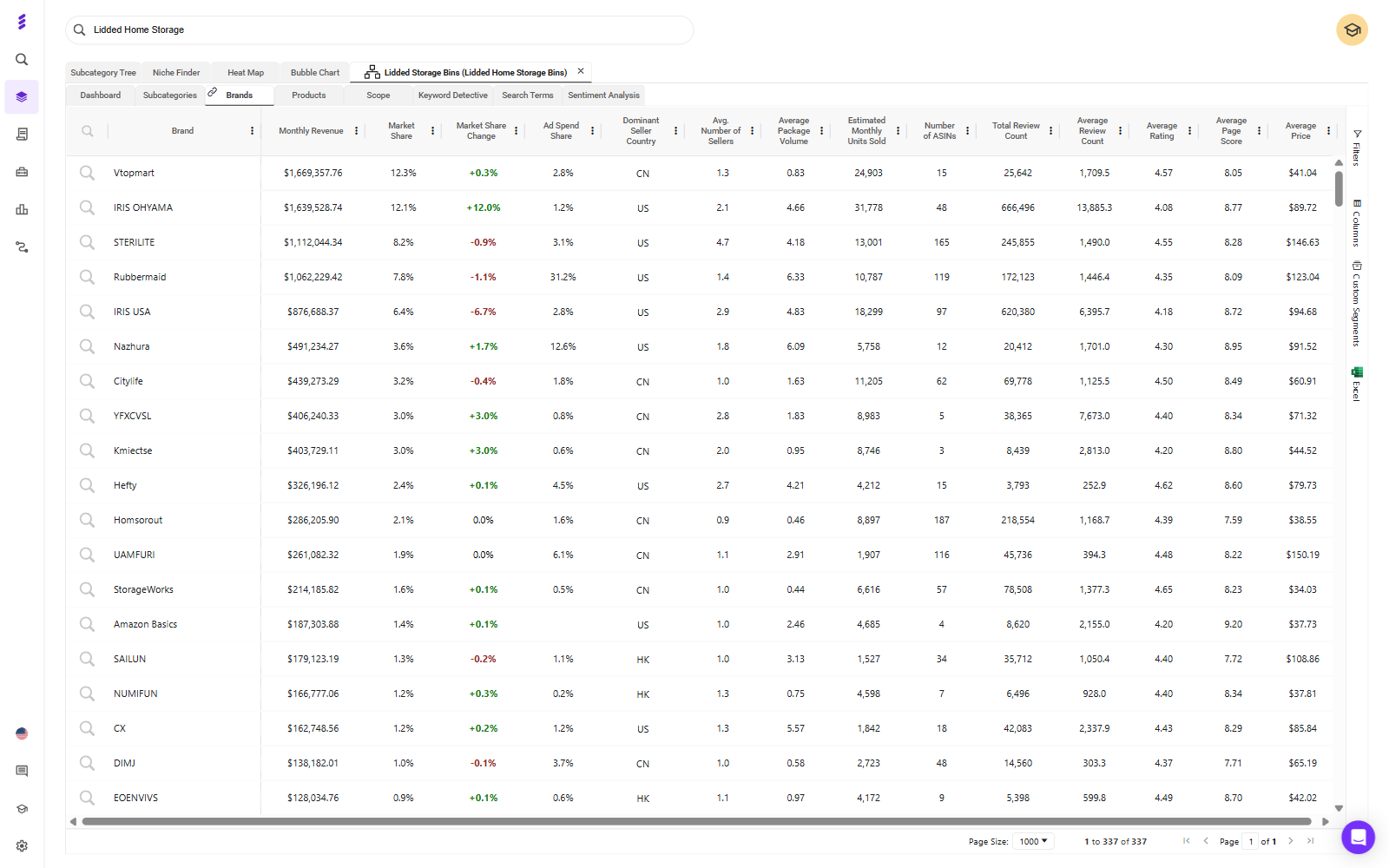
Open your target subcategory and go to its Brands view, which lists every brand selling there with its estimated revenue, market share and share of the subcategory's ad spend.
What to look for:
Ad spend share against market share. This is your first look at competitor ad data. In the example above, one brand holds under 8% of the subcategory's revenue but over 30% of its estimated ad spend. That brand is buying its position, and a brand whose ad spend share runs well below its market share is holding its position organically.
Concentration. If one or two brands hold most of the revenue, the head terms belong to them for now. Plan to enter through the segments they don't serve well.
Fragmentation. If share is spread across many brands, no one owns the shopper yet and a well-built listing has room.
Review depth. If the top products carry thousands of reviews and you're launching with none, expect broad terms to convert poorly until you've built a review base.
Amazon's own share. If Amazon sells heavily in the subcategory, factor that into your pricing and your expectations.
Separate the Winnable Gaps From the ASINs You Can't Beat Yet
Not every competitor is a target. Sort them into two groups before you spend anything.
Winnable gaps: segments where the leading products rate poorly, are priced above you, or leave a variant, size or pack count uncovered.
ASINs you can't beat yet: strong ratings, deep reviews and a lower price than yours. Attacking these at launch means paying to be compared against a better offer. Come back to them once your listing has reviews.
Finish this step with a short list: your target segment, the 3 to 4 competitors shoppers will compare you with, and the ones to leave alone for now.
Build the Keyword Set From Your Competitors' Best Terms
Pull the Terms Your Top 3 to 4 Competitors Rank and Pay For
Use three views together: one for what the category searches and pays for, one for what each competitor ranks on, and one for where they overlap.
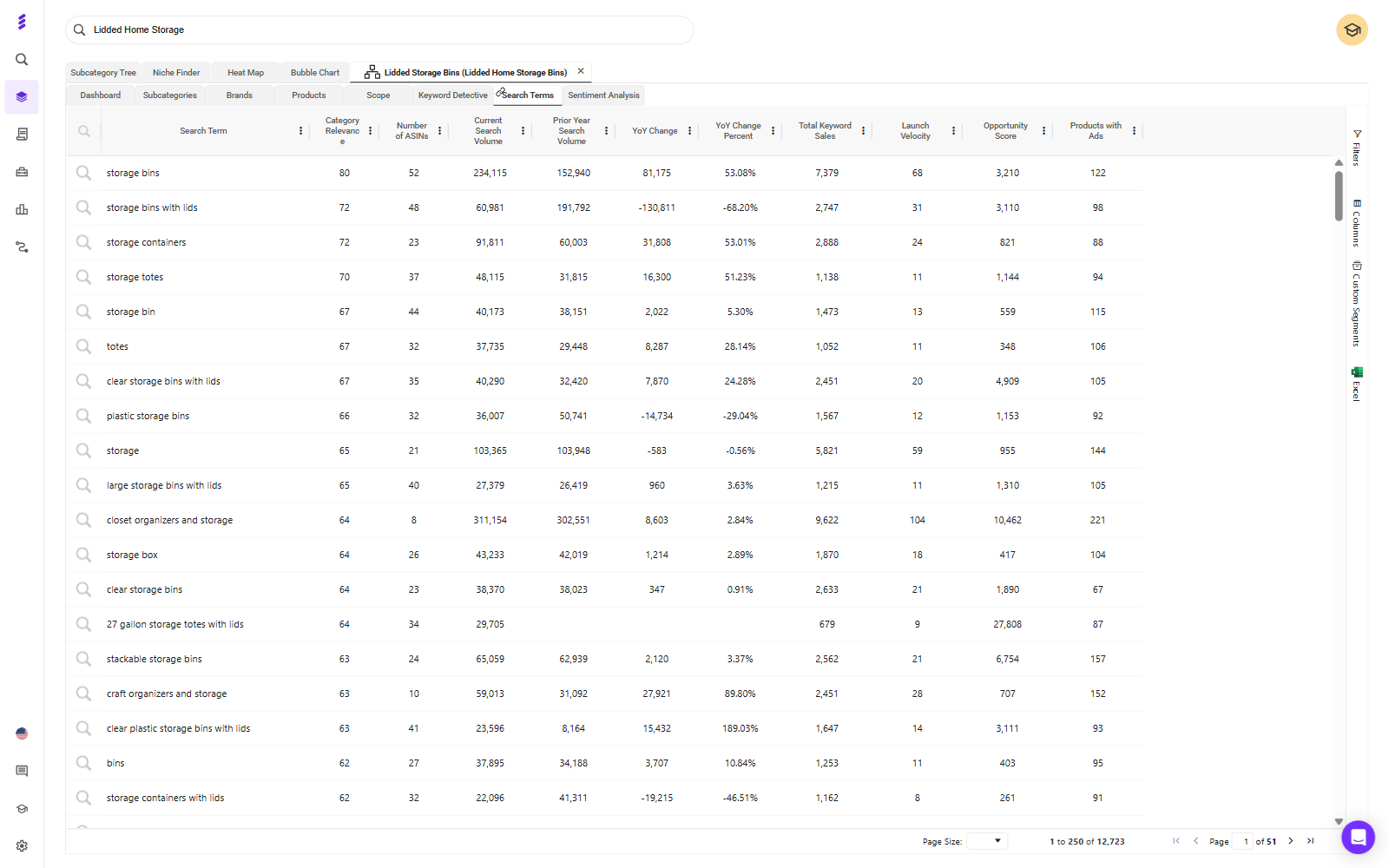
Search Terms for the category. Inside your subcategory, the Search Terms view lists the terms shoppers use to find these products, with search volume, year-on-year change and how many products advertise on each one.
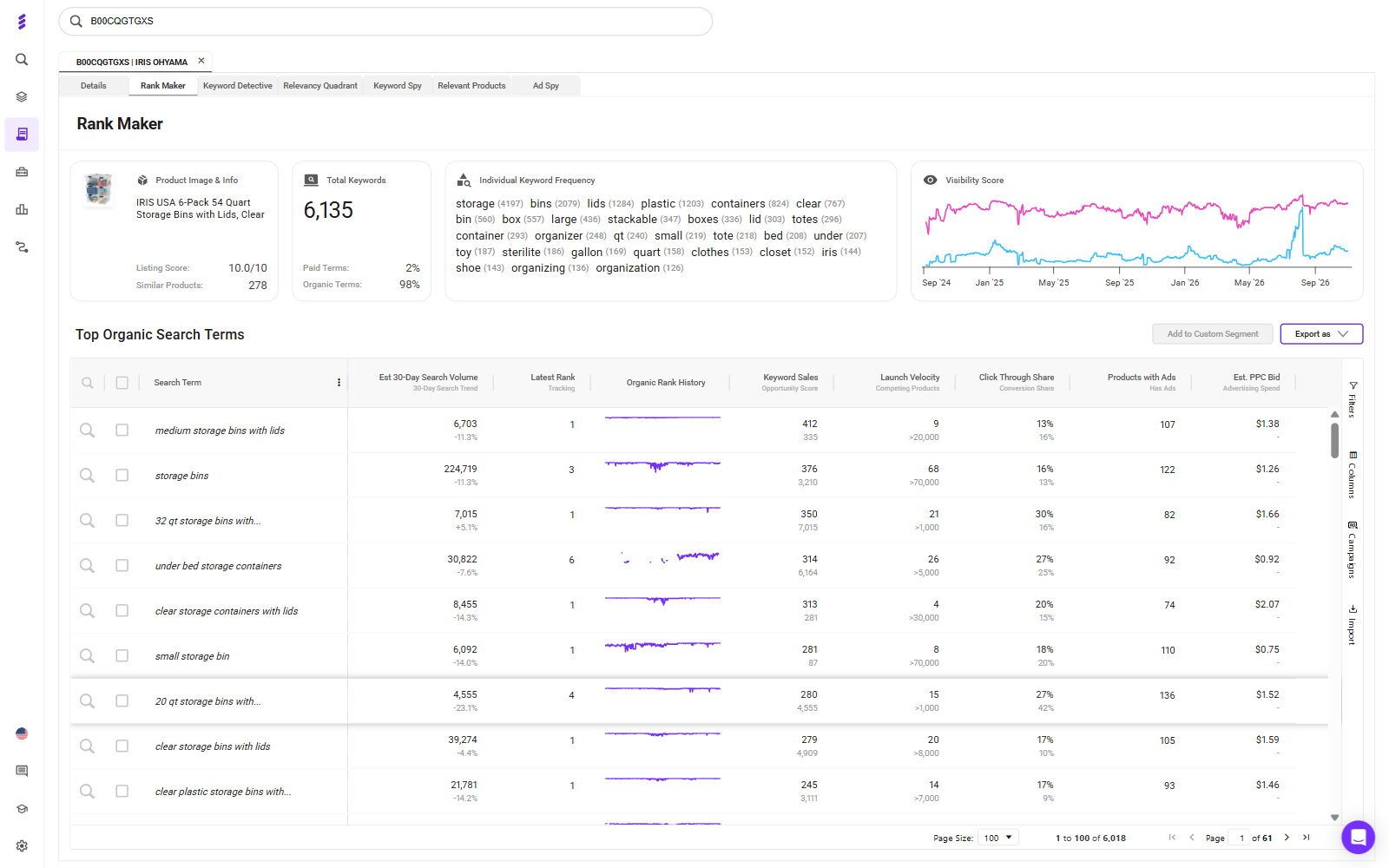
Rank Maker for each competitor. Run a competitor's main ASIN through Rank Maker to see the keywords it ranks for, how its terms split between paid and organic, its organic rank history and an estimated PPC bid for each term.
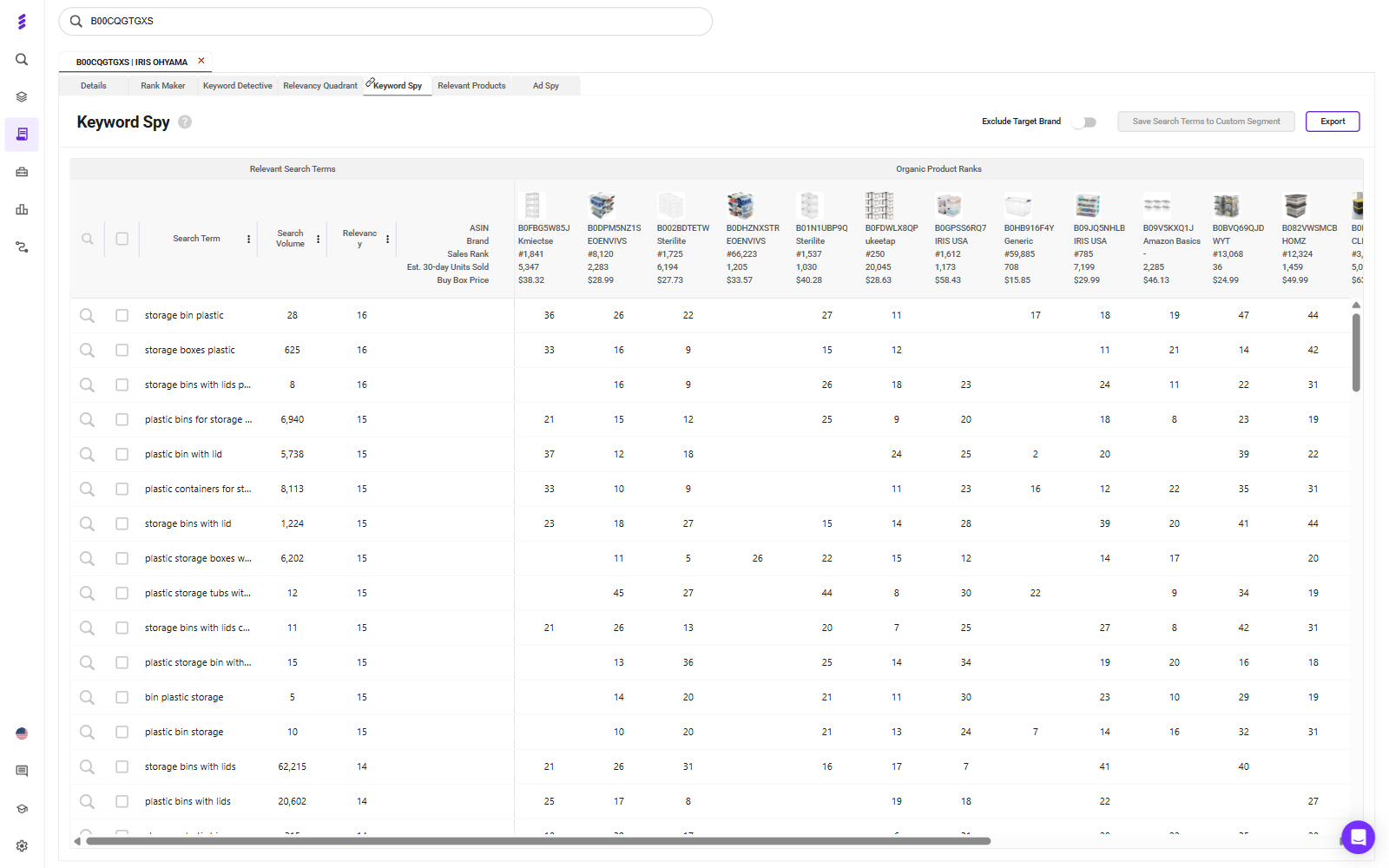
Keyword Spy for the overlap. Keyword Spy lines up the relevant search terms against the organic ranks of competing ASINs, so you can see which terms several competitors rank on at once.
The strongest launch candidates are the terms that appear across several competitors and still carry heavy ad competition. A term brands already rank on and keep paying to defend is one they clearly value.
On an Enterprise plan, SmartScout's Ad Spy goes a step further: enter a competitor brand and you see its paid search terms, the estimated searches on each, and how often it wins Sponsored Products, Sponsored Brands and top-of-search placements. Its spend numbers are estimates built from search volume, CPC, placement win rates and average click-through rates, and they leave out page two, Sponsored Display, product page targeting and DSP.
Treat every ad spend figure as an estimate, the ad spend share in the Brands view included. Use them to compare competitors against each other, not to set your budget to the cent.
Bucket by Job: Head, Mid-Tail and Long-Tail
Every term on the list has a different job at launch:
Head terms buy visibility at poor efficiency. Keep them small at launch, or hold them back until you have reviews.
Mid-tail terms are where intent and conversion usually sit. These are the core of your launch.
Long-tail terms are cheap volume with little competition. Let them feed your discovery campaigns.
Run a Relevance Check Against Your Own Listing
Before a term goes into a campaign, compare it with your listing. If a shopper searching that term would pick the competitor's product over yours on the results page, don't buy the click.
A competitor might rank for "with lid" or "pack of 6" because its product has those features. If yours doesn't, cut the term. A lower bid doesn't fix a mismatch between the search and the product.
Structure the Launch Campaigns
Fix the Listing Before You Buy Traffic
Ads send shoppers to your product detail page. They can't make that page convert. Get the images, title, bullets and A+ content right before any campaign goes live.
Reviews are the real early constraint for most launches. If your product is eligible, Amazon Vine is the cleanest way to get the first reviews in front of shoppers.
Give Each Match Type Its Own Campaign
Run Exact, Phrase, Broad and Auto as separate campaigns, never mixed in one. When they share a campaign, spend drifts to Broad, Exact gets starved and the reporting loses the signal you need to set bids.
Keep branded and non-branded terms in separate campaigns as well. They do different jobs, and blending them hides what your acquisition spend is actually doing. There's a fuller breakdown in this guide to Amazon PPC campaign structure.
Pair Low-Bid Discovery With a Tight Exact Campaign
Set the launch up in two layers:
Discovery: Auto and Broad campaigns at low bids. These let Amazon show you how it understands your product. In the Auto campaign, Amazon lets you set separate bids for close match, loose match, substitutes and complements, and they behave differently enough that they're worth bidding on separately.
Exact: a small campaign on the 5 to 10 overlap terms from your competitor research that you're most confident about. Give it higher bids and a protected budget.
Use Competitor Pages as Ad Placements
Target Competitor ASINs Only Where You Win the Comparison
Product targeting puts your ad on a competitor's detail page, where the shopper compares you side by side. That works when you win the comparison they're making: price, review count, star rating or pack size. If you're the weaker offer on that page, you're paying to advertise their product.
SmartScout's Traffic Graph maps which products shoppers move between, through frequently bought together and also-viewed links. Run it on your main launch keyword and it shows the product pages that already carry the shoppers you want, which makes them natural candidates.
Two more points:
Target the weak segment of a category. Category targets can be refined by brand, price and star rating. Aim at competitors rated under four stars, or priced above you, rather than the whole category.
Start small and judge on conversion. SmartScout's ad estimates don't cover product page targeting, so you won't see what competitors spend there. Click-through rates are naturally lower on detail pages than in search, so judge these campaigns on conversion and return on ad spend, not CTR.
Defend Your Own Detail Page
Once you're live, target your own ASIN pages too. It's cheap, and it keeps the ad slot under your product from going to a competitor at the moment the shopper is deciding. If you sell complementary products, this is also where they cross-sell.
Bid and Harvest in the First 30 Days
Accept Bad Efficiency Early
For the first month you're buying two things: rank and data. Your ACoS will look poor, and that's expected.
Move bids in small steps, around 10 to 15% every two to three days, so you can tell which change caused which result.
Harvest Converters Into Exact, Then Negate Them at the Source
Once a week, pull the search term report from your Auto, Broad and Phrase campaigns:
Move search terms that convert into your Exact campaign.
Add those same terms as negative exact in the campaign they came from, so you aren't paying for the same search in two places or losing control of which campaign serves it.
Add negative phrase targets for whole themes that are clearly irrelevant.
Give discovery time to work. Amazon suggests letting a new automatic campaign run for about two weeks before you build manual campaigns from its data.
Agree the Kill Criteria Before Spend Starts
Decide before you spend: what conversion rate, by what date, at what spend, and what happens if you miss it. Fix the listing, change the price, pause or liquidate.
Apply the same discipline to individual terms. At a 10% conversion rate, 10 clicks should produce about one order. Give a term two to three times that before you judge it, then pause it rather than shaving the bid forever.
The worst launches I've seen had no stop condition. They ended by attrition, long after the data had made the answer clear.
Measure the Launch on TACOS, Not ACoS
Why ACoS Should Look Bad During a Launch
ACoS is ad spend divided by ad sales. During a launch you're paying for rank that will later earn organic sales, and ACoS gives that spend no credit for them.
TACOS is ad spend divided by total sales, ads and organic together. If the launch worked, organic sales grow and TACOS falls over the following months, even while ad spend holds steady. That falling line is the proof. You can track it with a free TACOS calculator.
Neither number is the goal, though. Profit is. A 30% ACoS is healthy on a product with a 50% margin and a loss on one with a 20% margin, so know your margin before you set any target.
Track Organic Rank on Your Launch Terms as the Leading Indicator
Sales lag visibility. Once you're live, run your own ASIN through Rank Maker every week. The organic rank history on each launch term, and the visibility score trend above it, show whether the rank you paid for is holding. A term where organic rank keeps climbing is one you can start to bid down.
On an Enterprise plan, SmartScout's Share of Voice adds the category view: it splits your visibility on a set of keywords into organic and paid, week by week, against the rest of the category.
Conclusion
The fastest way to launch a new product on Amazon is to start from what your category already knows. Read the subcategory to find where you can win, build your keyword set from the terms competitors rank on and keep paying for, structure campaigns so every match type has its own job, and agree your kill criteria before the first dollar goes out.
Then judge the result the way a launch should be judged: by TACOS falling and organic rank rising over the following months, not by ACoS in the first one.
Shoppers can ask Amazon questions such as “Which carry-on fits a weekend trip and a small overhead bin?” For brands and sellers, that makes clear product information essential: your listing needs to explain who a product suits, what it does, and where it fits.
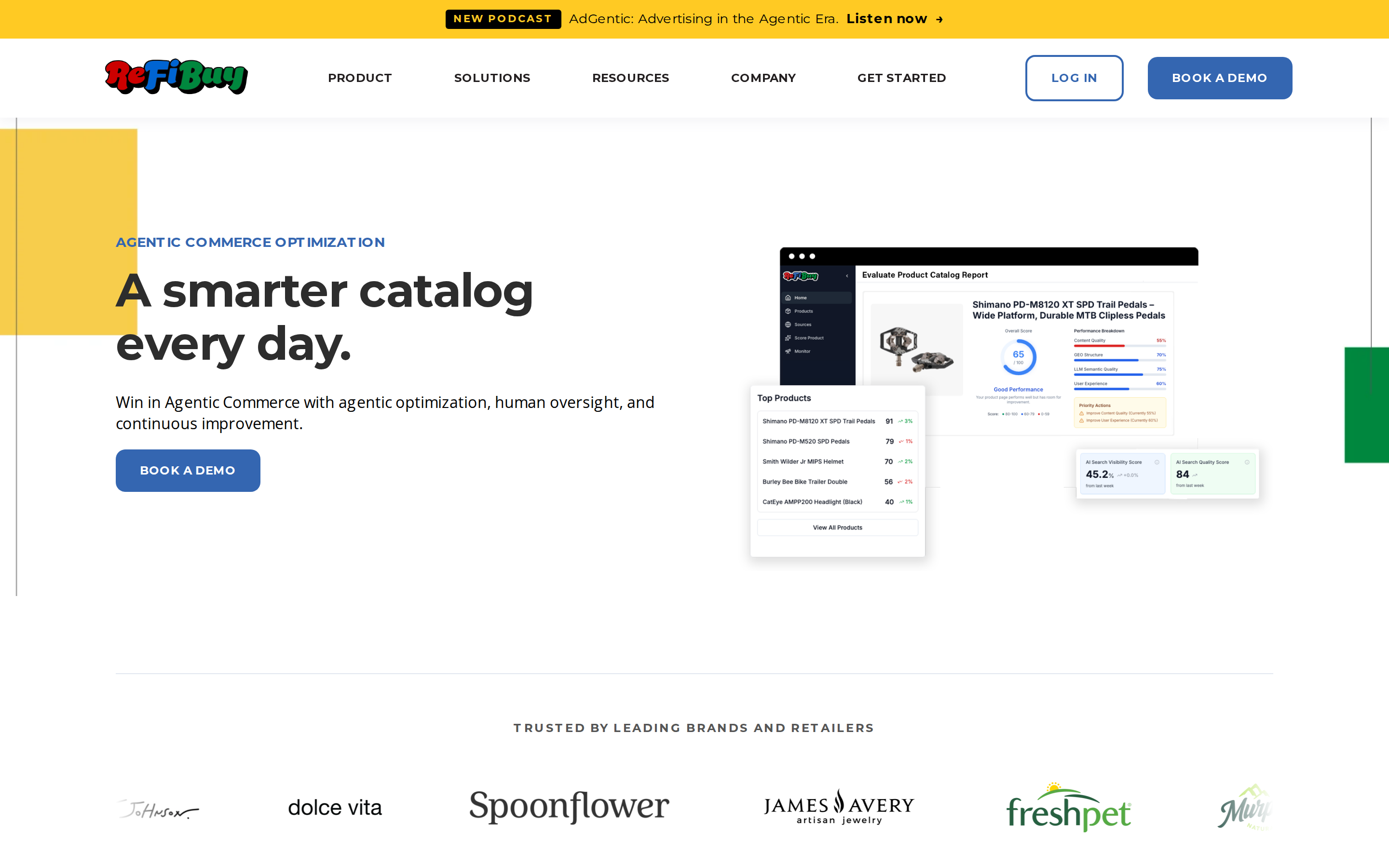
The best software tools for Alexa for Shopping help with different parts of that job. SmartScout helps diagnose content gaps, Azoma offers direct visibility tracking, and ReFiBuy combines product data enrichment with Alexa monitoring. Helium 10, DetailPage, and Salsify help teams create, optimize, and manage product information.
This is a SmartScout-published guide. The selections below reflect each tool’s documented capabilities and practical fit, rather than a controlled performance test.
What Is Alexa for Shopping
Amazon’s Alexa for Shopping brings together Rufus’s shopping expertise and Alexa+ personalization. It works in the Amazon Shopping app and website, with shopping experiences also available on Echo Show.
Amazon says the assistant combines product knowledge and information from across the web with customers’ preferences, shopping history, and conversations. It can answer questions, compare products, and recommend options.
For sellers, the practical implication is to make product information specific enough to answer real buying questions. Keywords remain useful, but “travel backpack” alone says less than accurate details about capacity, dimensions, compartments, and intended use.
Best Alexa for Shopping Software at a Glance
Tool
Best fit
Role in improving visibility
SmartScout
Diagnosing Amazon listing content gaps
AI Scorecard with 15 dimensions; separate ChatGPT visibility and citation monitoring
Azoma
Measuring presence in Alexa for Shopping
Advertised tracking of mentions, recommendations, competitors, and citations
Helium 10
Building listings from keywords and shopper questions
AI Listing Builder with Rufus-derived customer insights
DetailPage
Managed product content optimization
Search content, image analysis, publishing support, and Amazon analytics
ReFiBuy
Product data enrichment and Alexa monitoring
Listing assessments, reviewed content improvements, and visibility tracking
Salsify
Managing large product catalogs
Product data management, Amazon syndication, and A+ publishing
Content diagnostics, content production, and assistant visibility tracking measure different things. A higher listing score is useful feedback, but it is not proof that Alexa recommended the product.
1. SmartScout
Best for Identifying What Your Amazon Content Needs To Communicate More Clearly.
SmartScout’s Amazon AI Scorecard evaluates product content across 15 dimensions aligned with Amazon’s COSMO approach to product understanding. It helps brands assess whether their listings clearly communicate product identity, intended audience, functionality, use cases, and other important context.
The scorecard combines a listing grade with written and visual content analysis and actionable recommendations. That makes it useful for prioritizing improvements across a catalog.
For example, a backpack listing might describe “premium materials” without clearly explaining laptop compatibility or storage capacity. The useful next step is to add verified product details that answer those questions.
The score is SmartScout’s assessment of content readiness, rather than an Amazon-issued rating or a direct measurement of Alexa recommendations.
SmartScout also offers anAI Visibility Monitor that tracks product and brand visibility in ChatGPT, including competitor comparisons and the websites cited in responses. It does not monitor Alexa for Shopping.
That separate view can help brands identify web content and mentions to investigate as part of a broader AI discovery strategy. ChatGPT citations do not establish which sources Alexa uses for the same question.
Choose SmartScout when: You want a practical Amazon content audit alongside visibility into how ChatGPT presents your products.
2. Azoma
Best for Brands That Want To Measure Visibility Directly Inside Alexa for Shopping.
Azoma advertises share-of-voice tracking for Alexa for Shopping at the category, brand, and ASIN level. Its product-level tools track mentions, rankings, and competitive visibility across shopper queries.
It also offers a Conversation Explorer for identifying product questions and citation intelligence for examining websites referenced in shopping recommendations.
For teams asking, “Are we appearing, and which competitors appear instead?” this is a more direct fit than a content score alone. During evaluation, ask how the platform selects prompts, repeats measurements, and handles personalization. Those details determine what its visibility metrics represent.
Choose Azoma when: Measuring Alexa recommendations and competitive presence is a central requirement.
3. Helium 10
Best for Combining Keyword Research With Questions Shoppers Ask Amazon’s AI.Helium 10’s AI Listing Builder combines keyword inputs, product information, images, and brand voice to generate listing content.
Its documented Rufus integration lets users enter up to two ASINs and incorporate extracted customer questions and concerns into listing generation. That is useful when a listing includes relevant keywords but still leaves important buying questions unanswered.
Its strength here is turning research into titles, bullets, and descriptions. Treat that workflow as content optimization rather than evidence of increased Alexa share of voice.
Choose Helium 10 when: Your team already uses its keyword tools and wants shopper questions incorporated into listing updates.
4. DetailPage
Best for Brands That Want Managed Content Optimization Backed by Retail Analytics.DetailPage combines product detail page content optimization, image analysis, and analytics. Its search offering addresses traditional retailer search and AI shopping discovery, including Amazon’s shopping assistant.
The service includes content updates, uploads, monitoring, and support tickets. Its image analysis uses customer feedback to identify important features and gaps in how product benefits are communicated, helping teams turn recommendations into published improvements.
DetailPage’s Insights platform also provides Amazon metrics and share-of-voice reporting for ChatGPT and Gemini. Keep those chatbot metrics separate from Alexa visibility: its relevance here is primarily content optimization and execution.
Choose DetailPage when: You want a partner to improve and maintain product content, with analytics to support ongoing decisions.
5. ReFiBuy
Best for Connecting Amazon Listing Assessments, Product Data Enrichment, and Alexa Visibility Monitoring.ReFiBuy’s Alexa for Shopping offering identifies gaps in Amazon product data, recommends improvements to content and attributes, and tracks how products appear in the assistant’s responses.
Its Amazon PDP Score establishes a baseline across availability, findability, trust, and selection. Teams can compare existing and proposed content, review confidence scores, and approve, edit, or reject recommendations before using them.
This workflow is useful when product knowledge exists inside the business but is missing from listings—for example, details about fit, materials, or specific use cases. ReFiBuy connects those content improvements with ongoing observation of Alexa responses; its PDP score remains a diagnostic, not an Amazon-issued ranking.
Choose ReFiBuy when: You want listing enrichment and Alexa visibility monitoring in the same workflow, with human review of proposed changes.
6. Salsify
Best for Brands Managing Product Information Across Large Catalogs and Multiple Channels.Salsify centralizes product data and digital assets, syndicates content to Amazon, and supports publishing Basic and Premium A+ content through direct integrations.
For larger brands, the obstacle is often inconsistent information: specifications live in one system, images in another, and retail pages contain outdated descriptions.
Salsify helps teams maintain and distribute that information. Its relevance to Alexa for Shopping is the foundation it provides for complete, consistent product content; its Amazon publishing capabilities are not themselves a measurement of AI recommendations.
Choose Salsify when: Content governance, catalog consistency, and publishing workflows are your biggest challenges.
How To Improve Your Visibility in Alexa for Shopping
Start with a small group of important ASINs and follow a repeatable process.
Define realistic shopper questions. Include use cases, comparisons, compatibility, dimensions, and limitations.
Audit your content. Use SmartScout’s AI Scorecard to identify missing or unclear information.
Publish specific improvements. Update relevant attributes, bullets, descriptions, images, and A+ content with verified facts.
Measure the right outcome. Track Alexa answers separately from keyword rankings, content scores, and ChatGPT visibility.
Repeat the same questions over time. Record the prompt, date, marketplace, and testing conditions so changes are easier to interpret.
Because Amazon personalizes its assistant, one answer is a snapshot. Look for repeatable patterns across a defined question set.
Which Tool Should You Choose
For brands and sellers starting with listing improvements, SmartScout is a strong starting point. Its AI Scorecard turns content gaps into an actionable list of fixes.
Add Azoma for direct Alexa visibility measurement, or ReFiBuy for a workflow combining listing enrichment and Alexa monitoring. Choose Helium 10 for listing generation tied to keyword research, DetailPage for managed content optimization, or Salsify for catalog management.
The goal is to give Amazon clear, accurate information that helps it match your products to relevant shopper needs.
6 Best Tools for Improving Alexa for Shopping Visibility for Brands and Sellers