


"Used - Like New" is one of the most valuable condition grades on Amazon, and one of the easiest to get wrong. Grade an item correctly, and you sell a returned or open-box product at close to new pricing. Grade it too generously and you invite returns, complaints, and damage to your account health.
This guide covers exactly what the condition means, every used tier alongside it, the category rules that change the definition, how to list and price these items, and the mistakes that quietly cost sellers money.
What Does “Used - Like New" Mean on Amazon?
In Amazon's own words, a Used - Like New item is one in like-new condition with no scratches or scuffs, in perfect working order, just as it would be if purchased new, except the package is no longer sealed. The original protective wrapping may be missing, but the original packaging should be intact and in good condition, with only minor damage possible, and all instructions and accessories included. You can read the full definitions in Amazon's Marketplace Items Condition Guidelines.
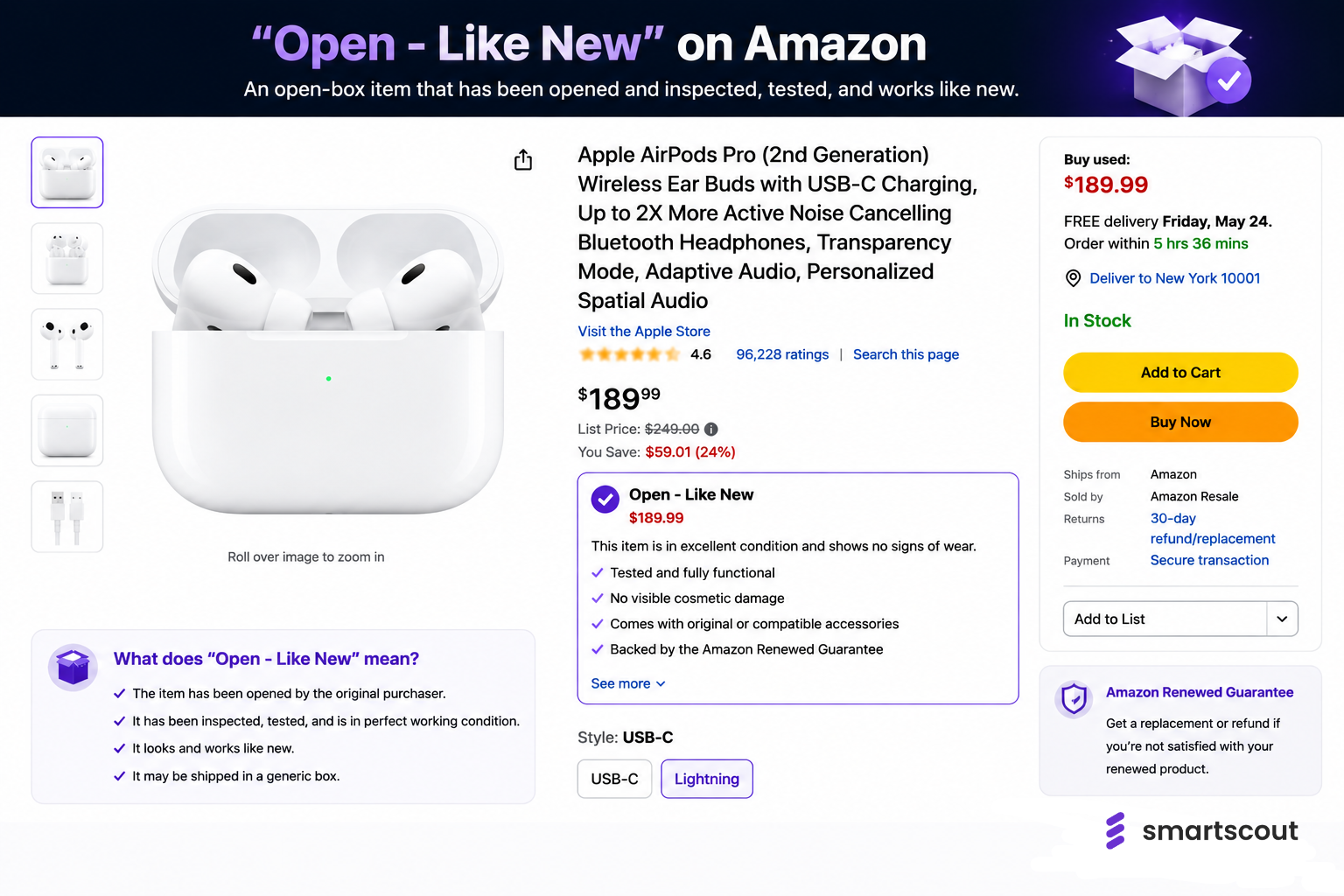
The single most important detail sellers miss is packaging. Used - Like New requires the original packaging. You cannot repackage an item in a plain box and still call it Like New. If the box is gone or badly damaged, the item belongs in a lower tier, no matter how flawless the product itself looks. For some categories, Amazon also displays this exact grade as "Open Box."
Amazon Used Condition Tiers Explained
Used - Like New sits at the top of four used grades. Knowing where each one ends and the next begins is what keeps your listings accurate and your feedback clean.
Two grades sit outside this scale. "New" means unused, unopened, and in original packaging. "Renewed" is a separate certified program, covered below. For the lowest tier, our guide to Amazon's Acceptable condition goes deeper on where the floor sits.
Used - Like New vs Very Good: The Differences
The jump from Very Good to Like New is bigger than most sellers realize, and over-grading is where condition complaints start. The deciding factors are simple: a Like New item shows zero visible wear and keeps its original, intact packaging, while a Very Good item can have small blemishes, repackaging, or a missing minor accessory.
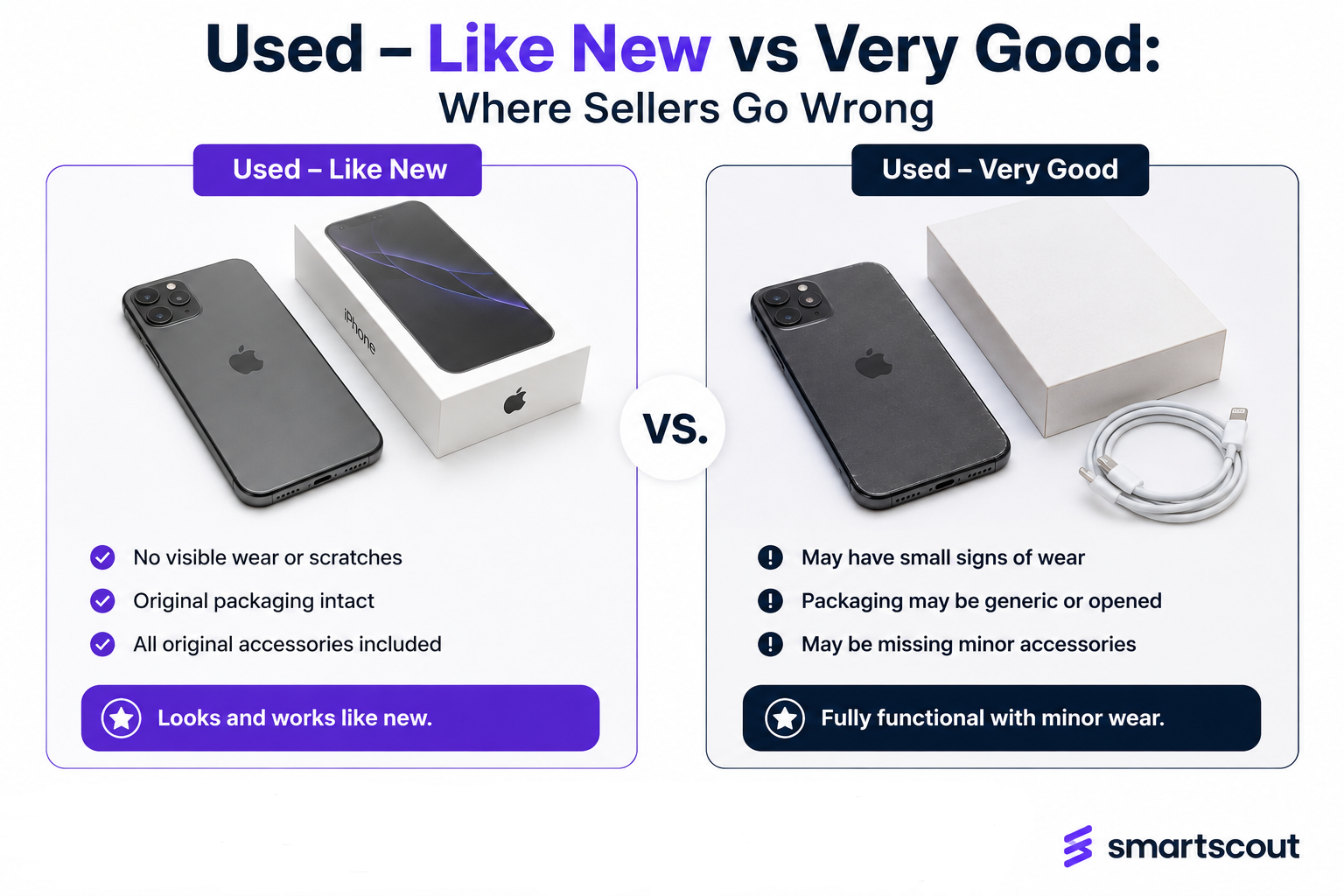
If you are hesitating between the two, choose Very Good. Underselling the condition costs you a little on price; overselling it costs you a return, a negative review, and a hit to your metrics. When in doubt, downgrade.
Used - Like New vs Renewed, Open Box, and Refurbished
These terms get used interchangeably, but they are not the same thing. Used - Like New is a self-graded condition you assign to a pre-owned item that still looks and works like new.
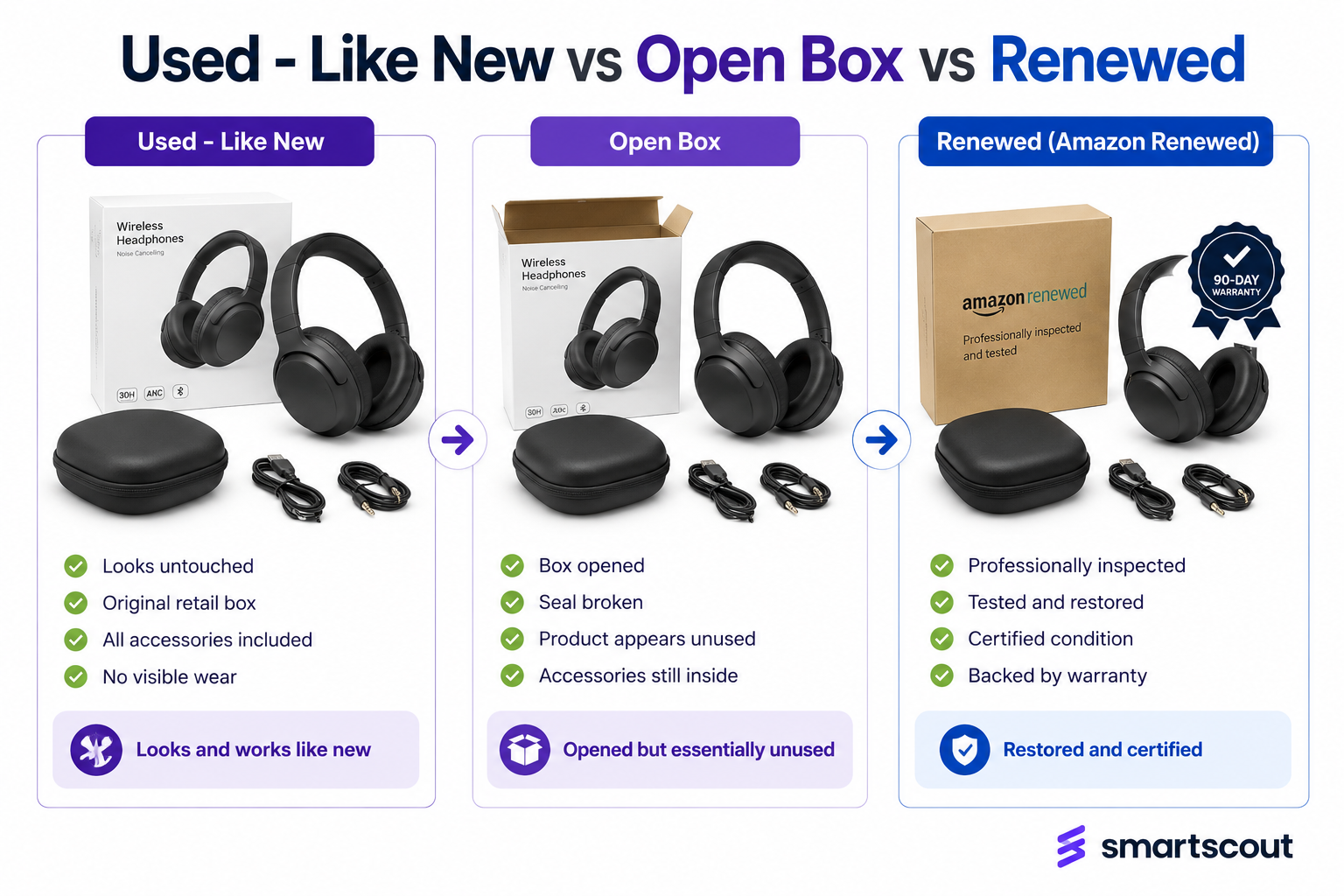
"Open Box" is how Amazon labels that same Like New grade in certain categories, typically meaning the seal is broken, but the product is untouched. "Renewed" and "refurbished" are different entirely: Amazon Renewed is a certified program for inspected, tested, and warrantied products, with its own seller qualification requirements.
If your item was professionally restored to working order, it may belong in Renewed rather than Used - Like New, and the two have very different eligibility rules.
Category-Specific Condition Rules
Amazon layers category-specific guidelines on top of its general ones, so "Like New" can mean slightly different things depending on what you sell. A few examples worth knowing:
- Books: The dust cover must be intact and pages clean and unmarked. Remainder marks are allowed but should be noted, and any highlighting pushes the book down to Good or lower.
- Music, DVDs, and games: The case, cover art, and liner notes must be free of scratches and scuffing, with all inclusions present.
- Electronics: All original cables, chargers, and accessories must be included and fully functional, since a missing cable alone can disqualify the Like New grade.
Always check the guidelines for your specific category before listing, because the general definition is only the starting point.
What You Cannot Sell as Used on Amazon?
Not every product can be sold used. Many categories are new-only, including most grocery, health and personal care, topical and ingestible items, and a large share of baby products, for safety and hygiene reasons.
Selling used also depends on your selling eligibility in that category, since some are gated and require approval. Before you source returns or open-box inventory to flip, confirm both that the category permits used offers and that your account is approved to list in it.
How to List a "Used - Like New" Product?
Once you have confirmed the item qualifies and the category allows it, listing is straightforward:
Step 1. Inspect the item against your category's guidelines, checking the product, packaging, accessories, manuals, and cables.
Step 2. In Seller Central, choose Add a Product and find the existing listing by ASIN, UPC, or name.
Step 3. Select "Used - Like New" from the condition dropdown, but only if it genuinely meets every requirement.
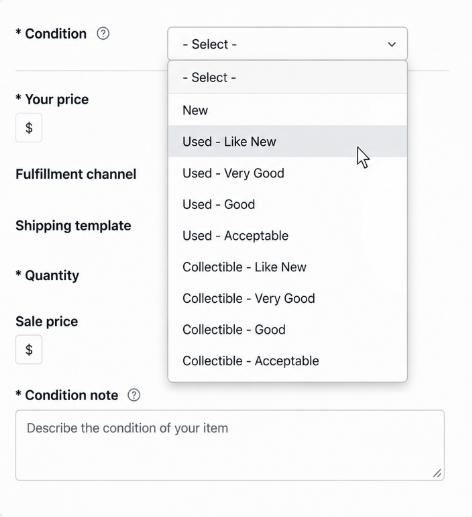
Step 4. Write detailed condition notes describing exactly what the buyer will receive.
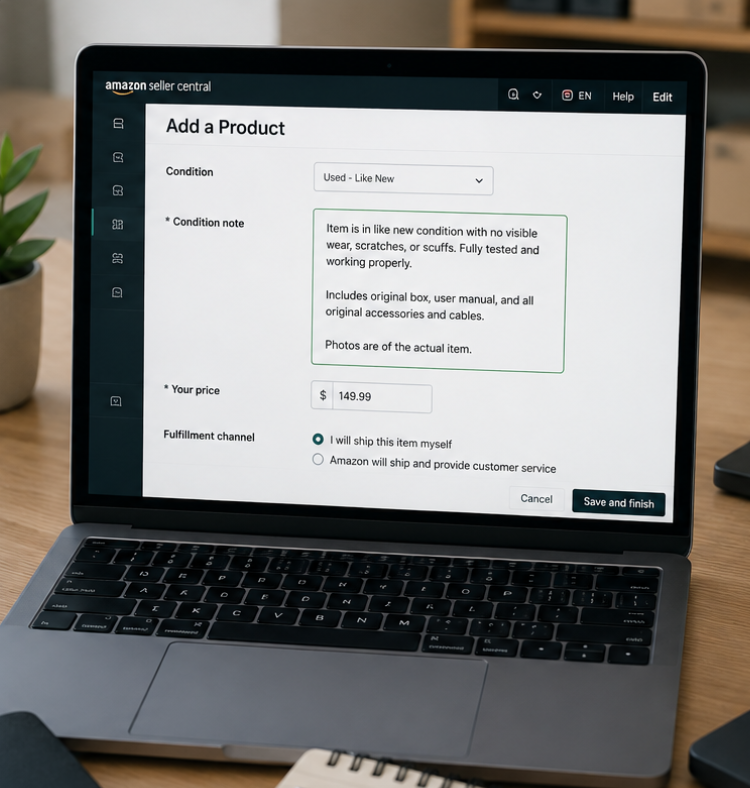
Step 5. Set your price and choose your fulfillment method, then publish the offer.
How to Write Condition Notes That Reduce Returns
Condition notes are your single best defense against "item not as described" complaints. The goal is to leave the buyer no room for an unpleasant surprise.
Strong notes state the exact state of the packaging, list every accessory included, and disclose even small flaws openly. Counterintuitively, naming a minor imperfection builds trust and lowers returns, because buyers accept issues they were told about in advance.
Note that condition notes appear on merchant-fulfilled offers, so if controlling that message matters to you, that is a point in favor of fulfilling the item yourself.
FBA vs FBM for Used Items
Both fulfillment methods accept used inventory in many categories, but they trade off differently. Fulfillment by Amazon gives your used listing Prime eligibility and faster shipping, which lifts conversion, but your custom condition notes carry less weight in the buyer's decision.
Merchant fulfillment lets you display detailed condition notes and control packaging and presentation, which matters a lot for higher-value Like New items where a buyer wants reassurance.
Before committing inventory either way, run the numbers through the FBA Calculator so storage and fulfillment fees do not erase the margin on a discounted used unit.
Pricing and the Used Buy Box
Used offers compete in their own Buy Box, separate from the new one, so you are pricing against other used listings as much as against the new price. Condition, price, seller metrics, and Prime eligibility all factor into who wins that used Buy Box.
A Like New unit can command a meaningful premium over Very Good, but only if buyers trust the grade, which loops back to honest notes and strong feedback. It also helps to know who you are up against: Amazon itself sells returned and open-box stock through Amazon Warehouse, which often sets the price ceiling for used offers on popular ASINs.
Why Accurate Grading Protects Your Account
Condition grading is not just a customer-experience nicety, it is account protection. Over-grading leads to returns and "item not as described" claims, which drag down your seller feedback and order defect rate.
A pattern of condition complaints can trigger listing removals and, in serious cases, account suspension. Viewed that way, grading conservatively is simply risk management. The few dollars you give up by listing a borderline item as Very Good are cheap insurance against a metrics problem that is far harder to fix.
How SmartScout Helps You Source Used Inventory Profitably
Grading an item well only pays off if it was worth sourcing in the first place. Before you buy returns, open-box lots, or liquidation pallets to resell, it is worth checking that real demand and a workable margin exist. SmartScout supports that homework:
- Gauge demand and competition for a product through the Products database and Subcategories browser before committing cash.
- Scan supplier and liquidation lists in bulk with the UPC Scanner to surface the items actually worth flipping.
- Size up the sellers and brands you would be competing against using the Brands tool and Seller Tools.
Pair that research with conservative grading and clear condition notes, and used inventory becomes one of the steadier ways to earn margin on Amazon.
The Bottom Line
Used - Like New rewards sellers who are precise: a flawless product, intact original packaging, every accessory present, and honest condition notes. Treat the grade as a promise rather than a marketing label, downgrade whenever you are unsure, and confirm the category allows used offers before you source.
Do that consistently and you capture near-new pricing on pre-owned inventory without the returns and account risk that catch less careful sellers.
Start using SmartScout with risk-free pricing


