How to Search Amazon Storefronts and Sellers
When you’re browsing Amazon, it can be quite challenging to find detailed information about specific sellers and their products. Learning how to find Amazon sellers can unlock wholesale opportunities, competitive intelligence, and partnership deals. While you can look at a seller’s page or a brand’s storefront, this method often involves clicking through numerous pages, and still, you won’t be able to see revenue metrics or the best-selling products.
To find amazon sellers, you can use the Amazon seller name or seller name in the search bar. Amazon's search bar is an excellent place to start the hunt for a specific seller. You can also search for a seller by their storefront URL, browse by department or shop using the 'Shop by Department' feature, or filter by category to locate sellers within a specific niche. If you have a specific order, your order history can help you track and contact sellers, especially if the seller has rebranded or changed their storefront. After following the steps to find a seller’s page, you can also use the Amazon Seller Directory to browse sellers in various categories and regions, making it easier to identify merchants by department or shop.
Clicking on the seller’s name on a product listing leads to the seller profile and seller's storefront, where you can view their product catalog and reputation. Each seller has a unique seller id that can be found through their product listings or the complete Amazon seller list. Note that every Amazon seller has a unique identifier (seller id) that never changes, even if the seller name or storefront changes. To contact a seller, you can use the product listing page to send a message. Seller ratings and feedback are crucial for determining the reliability of a seller on Amazon.
If you know the amazon store's name, you can search for an amazon store directly to access their branded storefront. Amazon's algorithm prioritizes products over sellers, making it challenging to find specific sellers by name. Conduct thorough background checks on sellers, including their stock and fulfillment strategies, to ensure reliability and avoid issues.
Using a smart way and competitive intelligence, such as systematic analysis, monitoring competitors, and leveraging specialized tools, can make the process of finding and analyzing Amazon sellers more efficient and insightful. If you’re looking for a more efficient and insightful way to analyze Amazon sellers, SmartScout offers an excellent solution.
Exploring Sellers' Pages and Brand Storefronts
Amazon allows you to view seller profiles and brand storefronts, where you can browse through their product listings. To find a seller’s page, you can:
- Go to the product page: Find a product sold by the seller you’re interested in.
- Click on the seller’s name: This is usually found under the product title, next to “Sold by.”
- Explore their listings: You’ll be taken to the seller’s storefront, where you can browse through all the products they offer. Here, you can view all of the seller's products (seller's product) and analyze their reviews to assess customer satisfaction and product quality. Many Amazon sellers are actually manufacturers or authorized distributors willing to discuss wholesale, even if this is not advertised in their listings. You can often find location information on the seller profile, which helps you understand where the seller operates and their fulfillment capabilities.
To find other sellers offering the same product, look for the “Other Sellers on Amazon” section on the product page. Comparing other sellers and top sellers in a category can help you identify best-selling products and competitive pricing strategies.
Similarly, to find a brand storefront:
- Search for the brand: Use the Amazon search bar to find products by a specific brand.
- Click on the brand name: Usually located below the product title.
- Browse the storefront: You’ll see all the products offered by the brand, organized by categories.
After exploring seller pages, you can use Amazon’s messaging system to contact sellers for wholesale opportunities, brand collaborations, or supplier relationships. The Amazon seller community is massive and specialized, and collaboration can be highly valuable when you find the right partners. Sellers who succeed in partnerships study seller profiles, analyze product fit, and verify performance metrics before approaching. About 550 new sellers join Amazon daily, making the marketplace dynamic and constantly changing. Storefront longevity is a key indicator of a reliable seller, and evaluating a seller’s Buy Box performance can reveal their sales volume and defect rates.
However, this approach can be time-consuming and doesn’t provide in-depth data about the seller’s performance, best-selling items, or revenue metrics.
Understanding Amazon Marketplaces
Amazon marketplaces are dynamic, ever-evolving ecosystems that connect millions of buyers and sellers across the globe. With so many sellers offering products in various categories, finding a particular seller or navigating the search results can be a challenge for even the most experienced Amazon users. Whether you’re looking to identify a specific seller or simply want to explore new products, understanding how Amazon marketplaces operate is essential for making informed decisions and staying competitive.
A key feature of Amazon is the presence of third-party sellers. Not all sellers on Amazon are authorized dealers, and some may operate without the necessary permissions. This makes it crucial for buyers to check seller ratings and read customer feedback before making a purchase. Issues like slow shipping or poor communication can sometimes arise when dealing with unauthorized sellers, so taking the time to review a seller’s profile can help you avoid potential pitfalls.
To locate a specific seller on Amazon, buyers can use the Amazon search bar to enter the seller’s name or store name, or browse through various categories to find the seller’s storefront. The Amazon shopping app also offers a user-friendly way to search for products and sellers while on the go. Additionally, the “Sold by” feature on product listings allows buyers to quickly identify the seller behind a particular product and visit their storefront to explore more offerings.
For sellers, understanding the nuances of Amazon marketplaces is vital for success. Optimizing product listings, refining pricing strategies, and delivering excellent customer service can help attract and retain customers. Leveraging data and market intelligence tools like Jungle Scout enables sellers to analyze customer behavior, monitor competitor activity, and identify emerging market trends, all of which are essential for maintaining a competitive edge.
Amazon operates multiple marketplaces in different regions, such as the UK, each with its own set of rules and standards. Sellers must ensure compliance with these regulations to avoid disruptions to their business, while buyers can benefit from access to a wider range of products and competitive pricing from sellers around the world.
Navigating Amazon marketplaces requires a smart, user-friendly approach. By utilizing essential tools, checking seller ratings and feedback, and leveraging market intelligence, both buyers and sellers can connect more effectively, make better purchasing decisions, and thrive in the vast Amazon ecosystem.
The SmartScout Advantage
SmartScout is a powerful tool designed to make the process of analyzing Amazon sellers and brands more straightforward and informative. Here’s how SmartScout can enhance your search:
- Comprehensive Seller Database: SmartScout provides access to a vast database of Amazon sellers and brands. You can easily search for any seller and get a complete overview of their offerings.
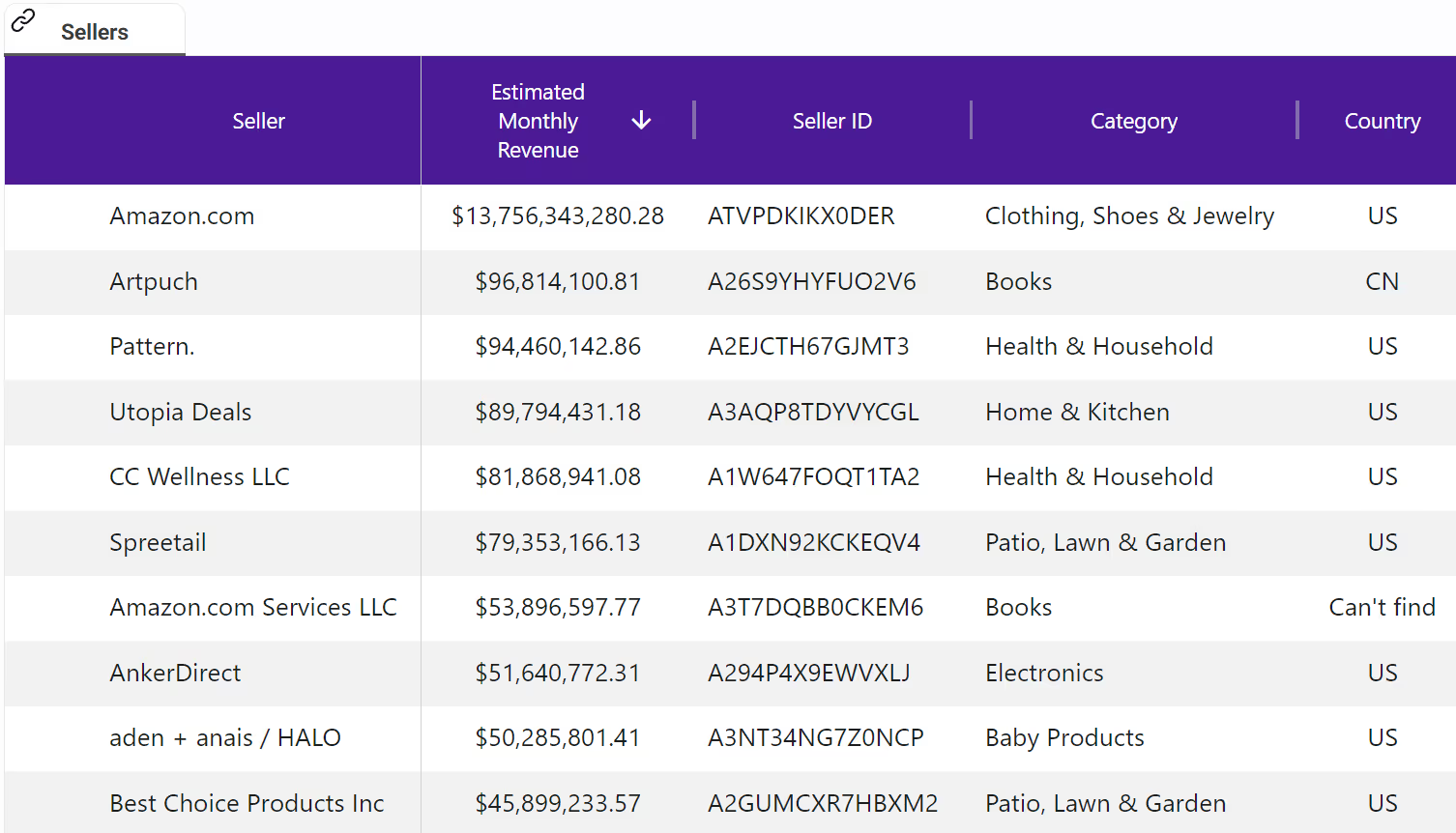
- Revenue Estimates: One of the most significant advantages of SmartScout is the ability to see estimated revenue for each seller. This insight helps you understand which sellers are performing well and which products are driving their sales.
- Product Listings: With SmartScout, you can view all products listed by a seller, along with crucial metrics such as estimated sales, price, and category. This comprehensive view allows you to quickly identify top-selling products and market trends. You can also use SmartScout to analyze competitors' pricing strategy and stay competitive by monitoring how they price their products and adjust your own approach accordingly.
- Category Focus: SmartScout lets you see the categories each seller focuses on, helping you understand their market strategy and specialization. This information can be vital for competitive analysis and market research. SmartScout also helps you analyze market share within specific categories, so you can see how local Amazon sellers compete and identify opportunities to improve your own competitiveness.
- Brand Associations: Discover all the brands a seller is associated with. This feature is particularly useful for identifying potential brand partnerships and understanding a seller’s product portfolio.
SmartScout supports competitive intelligence by enabling systematic competitive monitoring. It analyzes what competitors sell, tracking their product launches, and studying their pricing strategies. Successful sellers conduct systematic weekly routines for competitive monitoring to prevent being blindsided by competitive moves.
Top sellers and those making over $1 million in sales use competitive intelligence and systematic routines to track product launch patterns, study pricing strategies, and adapt their business to stay ahead in the market.
How to Use SmartScout
Using SmartScout to search for Amazon sellers and brands is straightforward:
- Sign Up: Start by signing up for SmartScout and logging into your account.
- Search for Sellers/Brands: Use the search bar to look for specific sellers or brands.
- Analyze Data: Access detailed reports on each seller or brand, including estimated revenue, product listings, and category focus. You can also use seller information for IP protection, such as reporting unauthorized sellers to Amazon.
- Generate Insights: Use the insights gained from SmartScout to make informed decisions for your business, whether it’s for competitive analysis, market research, or identifying potential partners. Reliable partners often maintain a professional website or social media presence, which helps build credibility and trust. You can use business information sites to track down local sellers and their performance metrics.
When contacting sellers through Amazon, avoid sharing personal contact information such as phone numbers to protect your privacy. If you encounter issues that cannot be resolved directly with the seller, consider reaching out to Amazon support for assistance.
Analyzing local competitors is crucial: find local sellers to understand your competition, their distribution hubs, and the customer base they target. Study their pricing strategies to see if they are underpricing or overpricing products, review customer feedback for insights into their strengths and weaknesses, and analyze their shipping and fulfillment tactics for potential logistical advantages. Leveraging local connections can help you engage with your community and build customer loyalty. Tools like GorillaROI can help you track local competitor trends over time.
Note: Amazon suspended over 3,000 seller accounts for IP violations during the 2024 holiday season, highlighting the importance of compliance and monitoring seller activities.
Conclusion
While Amazon provides basic tools to view seller pages and brand storefronts, these methods fall short in delivering comprehensive insights into seller performance and product trends. SmartScout bridges this gap by offering a robust platform that provides detailed data and analytics on Amazon sellers and brands.
With SmartScout, you can efficiently explore the entire database of Amazon sellers, gain valuable insights into their revenue, products, and market strategies, and make well-informed decisions to drive your business forward.

.png)