
Sentiment Analysis

Read Every Review on Any Product in Seconds, Not Hours.

Star Ratings Compress Thousands of Opinions Into One Number. This Breaks Them Back Open.
Open Sentiment Analysis on any ASIN and get two things: the review and rating trend over time, and a structured breakdown of what customers are actually saying. Positive topics, negative topics, how often each one comes up, real quotes as evidence, and the subtopics underneath. Every finding traces back to the reviews themselves, not a summary that smooths over the details.

It works on any product, not just yours.
Runs in Claude Desktop, Claude.ai, and Claude Code, and connects to OpenAI, Microsoft, Cursor, and Gemini too.
The Connector

Twenty Read-Only Tools, One Plain-Language Connection

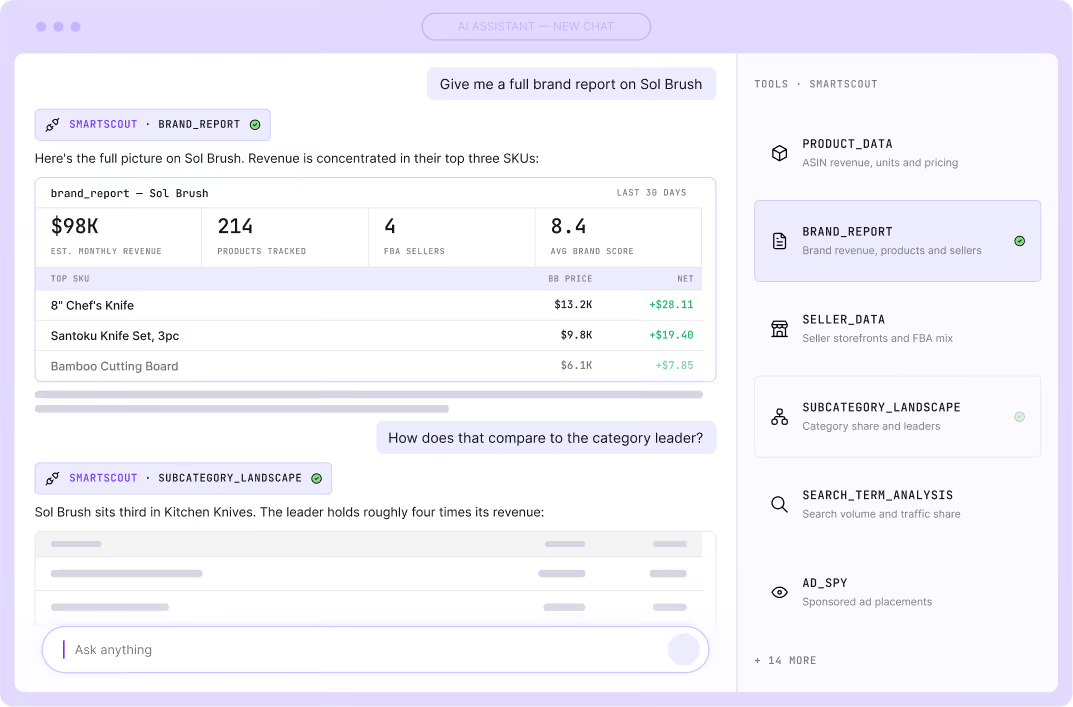
The SmartScout MCP server is a read-only connector built on Anthropic's open Model Context Protocol. It exposes 20 tools spanning products, brands, sellers, subcategories, search terms, and ad-spy data.
You ask in plain language, your AI calls the right tools, and the answer comes straight from SmartScout's live marketplace data. Nothing about your account gets created, edited, or written. It reads, and that is all it does.
Products
Brands
Sellers
Subcategories
Search terms
Ad-spy
Setup

Find Brands that Want Wholesale Partners

Step 1
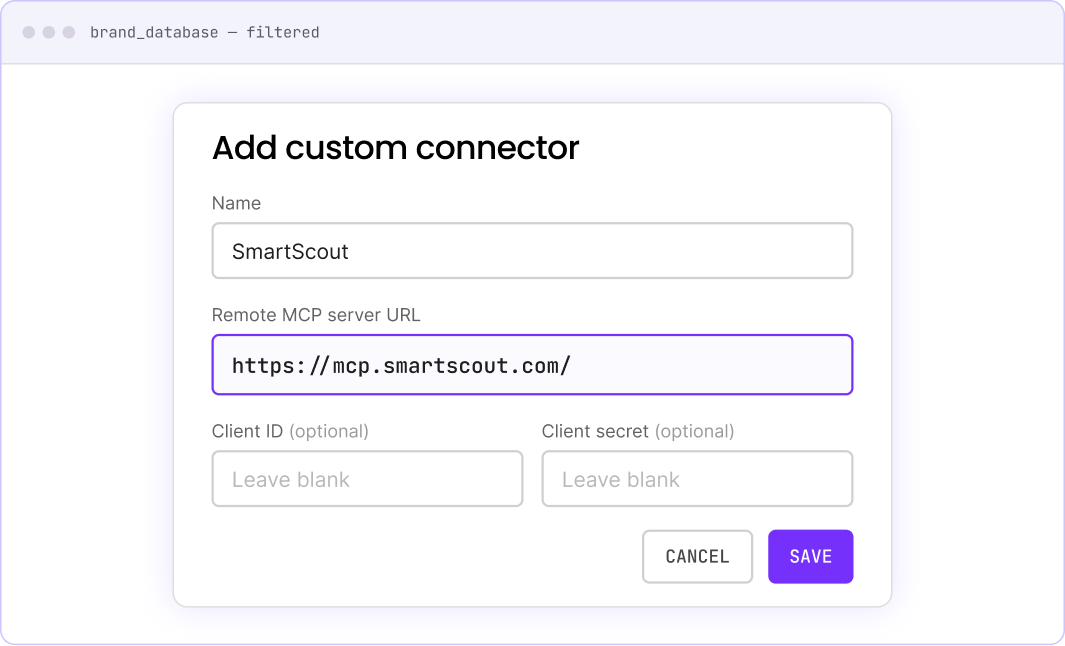
Open Settings, then Connectors, then Add custom connector.
Step 2
Paste this URL: https://mcp.smartscout.com/
Step 3
Leave Client ID and Client Secret blank. The server handles registration automatically.
Step 4
Name the connector "SmartScout."
Step 5
Click Save. A browser window opens to the SmartScout authorization page.
That’s it. The SmartScout tools appear in the tools tray of any new chat, and your AI can call them on your behalf. The same connector works in Claude.ai, Claude Code, and other MCP-compatible clients.

Five Prompt Examples to Try with SmartScout MCP

Each of these is one prompt through the connector. They are the questions SmartScout customers already run by hand every day.
Size up a keyword
"Run a keyword analysis on creatine"
Returns estimated search volume, CPC, the number of competing brands, and the sponsored-ad landscape for the term.
Pull a brand apart
"Give me a full brand report on Sol Brush"
Fans out in a single request to return the brand's revenue history, its sales by subcategory, its top 10 products, and its competitive set.
Map a category's power structure
"What does the competitive landscape look like for pickleball paddles?"
Identifies the subcategory, then returns total monthly revenue, leading brands by share, the Amazon-versus-third-party split, and average price points.
Wholesale & Arbitrage
"Show me the organic rankings for this protein powder ASIN"
Lists every keyword the product ranks for, its position on each, and the search volume behind it.
Competitor Research
"Show me the fastest-growing Amazon categories" or "Which categories have a summer slowdown?"
Scans thousands of subcategories for growth leaders and seasonality.
The Difference

Why It Is Different From Other MCP Connectors

Most seller-tool connectors are built to run your own account: your listings, your ads, your P&L. SmartScout's is built to answer questions about the market itself. Any brand, any seller, any subcategory, any keyword, not just the ones tied to your Seller Central login.

It is the difference between "manage my campaigns" and "show me who controls this category and what they are spending to keep it." Because it is read-only, you get that intelligence without ever handing an AI write access to your business.
Coverage

Everything the connector can reach

The 20 tools cover six SmartScout datasets:

Products

Any ASIN's data, estimated sales, and full organic keyword rankings.

Brands

Revenue history, subcategory sales breakdowns, top products, and competitive sets.

Sellers

Seller data and marketplace footprint.

Subcategories

Monthly revenue, brands by share, the Amazon-versus-third-party split, price points, and growth or seasonality across thousands of niches.

Search Terms

Search volume, CPC, competing brand counts, and the products that rank for a term.

Ad-spy

The sponsored and paid landscape behind a term or brand.

Read-Only

Security and
Data Handling

The connector is read-only. It cannot modify your SmartScout account, create resources, or write any data. Every request requires your explicit authorization, and your queries are forwarded to the SmartScout API exactly as your AI composes them, with no rewriting and no content collection by the server itself.

"One prompt, with the connector live, researches a brand I've never spoken to and returns three things: an internal research briefing with their wins, gaps and closest competitors, a send ready cold email that leads with a real number, and a branded one page PDF I can attach that shows them ground they're losing and don't know about."

SmartScout logo
Seth Miller | Founder, FBA+ Academy
FAQ

Frequently Asked Questions

Have something else? Reach out to support@smartscout.com and we’d love to chat.

Is the MCP the same thing as the SmartScout API?

No, though it is built on it. The API is for developers wiring SmartScout data into their own code and dashboards. The MCP connector is the conversational layer on top, so you can ask questions in a chat instead of writing requests.

Do I still need to open the SmartScout dashboard?

Only when you want to. The connector is meant to keep you in your AI for research and analysis. The dashboard is still there for the visual, click-through workflows the connector does not replace.

Can it really build a full brand report from a single prompt?

Yes. One brand-report request fans out across several tools at once, pulling revenue history, subcategory breakdown, top products, and the competitive set, then hands the whole thing back in one answer.

Where do the numbers in an answer come from?

From SmartScout's tools, not the model's guesswork. The connector returns SmartScout marketplace data, and your AI reports what those tools send back.

Can it place ads, edit a listing, or change anything on Amazon or in SmartScout?

No. It has no write access anywhere. It is strictly a reading and analysis tool, by design.

Which plan unlocks it, and is there an extra charge?

Business tier and above.

I use Claude, but can my team point other AI tools at it?

Claude.ai, and Claude Code, the server connects to OpenAI, Microsoft, Cursor, and Gemini, so a team can standardize on whichever client it prefers.

Connect Your Brand Registry Account and Start Exploring

Years of historical SQP data, a full conversion funnel view, and SmartScout competitive intelligence. All available within 48 hours of connecting.
Connect Your MCP server
*Historical pricing is available on every plan.
